Troubleshooting and FAQ
Quick answers to the questions traders ask most often, grouped by topic: building, backtesting, exporting and running, account, and general questions about AlgoPuzzle.
Last updated
Most problems in AlgoPuzzle have a simple cause. A block that will not snap in measures something different from the slot (for example a price in a slot meant for an oscillator value). The Next step bar always names what is missing and Show me points to it. "The rule never fired in this period" means the condition was never true: loosen it or test longer. An exported Expert Advisor that does not trade is usually blocked by the platform's Algo Trading / AutoTrading switch, a symbol name that differs at your broker, trading times, or the market being closed; the platform's Experts or Log tab says which. AlgoPuzzle is free to build, backtest and export with a free account, supports MetaTrader 5, MetaTrader 4 and cTrader, and is not financial advice.
Use the topics below, or search this page with Ctrl+F. Each answer links to the page that explains the topic in full. If your question is not here, email support@algopuzzle.com with a short description and, if possible, a screenshot.
Building a strategy
Why won't a block snap into a slot?
Two values can only be compared when they measure the same thing: a price with a price (candle prices, moving averages, Bollinger bands), an oscillator with a number (RSI with 30), and so on. A block of the wrong kind will not snap in, or is pushed back out with a message saying why. Use a value of the matching kind, or a plain number from Price & Numbers for oscillator levels. See Conditions and Indicators and values.
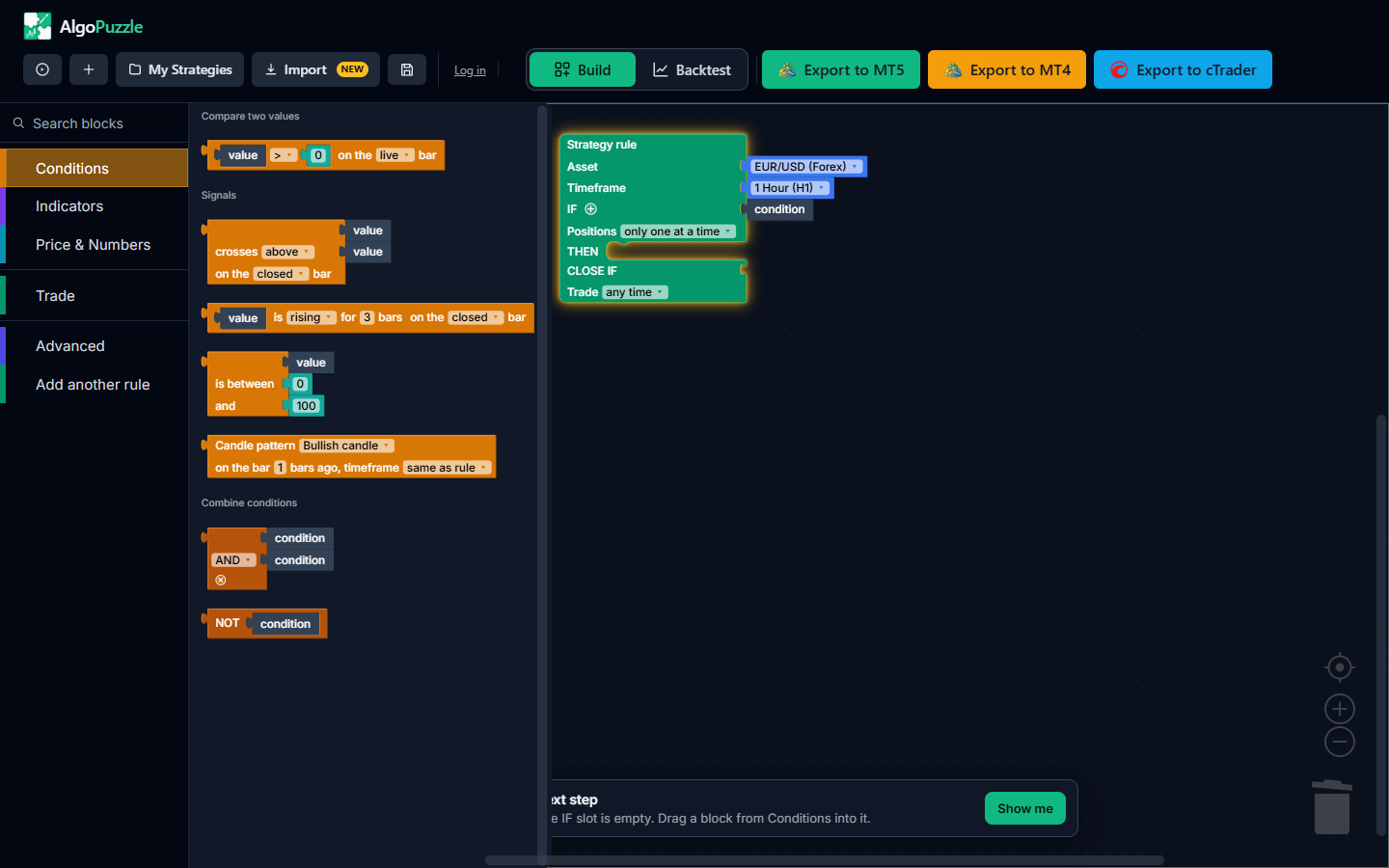
What are the grey "value" and "condition" placeholders?
They mark empty slots that still need a block. Drag a block from the matching drawer onto the placeholder to fill it: a condition from Conditions, a value from Indicators or Price & Numbers. A strategy with empty slots cannot be backtested or exported yet.
What does the Next step bar mean?
The bar at the bottom of the canvas checks the strategy as you build. It names the first thing still missing, shows how many other issues there are (+N more), and Show me highlights the block and the drawer to take the missing piece from. When nothing is missing it says Your strategy is complete and offers Backtest. See The builder screen.
How do I combine two conditions?
Click the small + next to IF. It wraps the current condition in an AND / OR block with a free slot for the next one. See Conditions.
How do I trade both buy and sell in one strategy?
Use two rules, one per direction. Add another rule adds a rule; each rule has its own asset and timeframe, and all rules are exported together as one file. See Strategy rules.
I deleted a block by mistake. Can I get it back?
Yes, press Ctrl+Z to undo. The canvas is also kept automatically in your browser between visits, and Save keeps named copies in My Strategies. See Account and saved strategies.
Backtesting
The backtest says "The rule never fired in this period". What is wrong?
Nothing is broken: the IF condition was never true during the tested period, so no trade opened. Loosen the condition, test a longer period or a lower timeframe, check your trading times, and read the plain-English summary at the top of the Backtest panel to make sure the rule says what you meant. See The rule never fired.
The backtest says it "can't simulate yet". What can I do?
The panel lists what is not supported, usually a market that is not on the backtest's list of markets, or more markets than one backtest can hold. The strategy itself is fine: export it and test it in MetaTrader's Strategy Tester. See Blocks that cannot be simulated yet.
Why can't I choose 1Y (or 6M) as the period?
The history for that market is not long enough yet. Presets that would start before the available data are greyed out. Pick a shorter preset or Custom dates.
Why are the backtest results different from MetaTrader's Strategy Tester?
The AlgoPuzzle backtest is a quick simulation on one-minute data with one spread for the whole period. The Strategy Tester uses your broker's own price history, spreads and swaps, and with "Every tick based on real ticks" replays every tick. Small differences are normal; compare on the same symbol, timeframe and dates. Large differences often come from very tight stops or trailing stops, a different spread, or a different period. See Limits of a backtest.
Why does Run backtest ask me to log in?
The historical market data loads only for logged-in users. Log in or create a free account and the backtest starts right after.
Why is the Monte Carlo tab empty?
Monte Carlo needs at least 30 closed trades. Test a longer period or a lower timeframe. See Monte Carlo analysis.
Exporting and running the strategy
I press Export and nothing is downloaded. Why?
On an untouched canvas there is nothing to export yet, so the builder opens the starting points instead: pick a strategy to start from, then export it. On an incomplete strategy the export shows what is still missing; complete it using the Next step bar. See Export to MT5, MT4, cTrader.
Why does Export ask me to log in?
Exporting needs a free account (email and password, no card). Log in or sign up in the window that opens and the export continues on its own. Exports are free and unlimited.
My Expert Advisor is attached to the chart but does not open trades. What should I check?
First open the Experts tab (MetaTrader) or the Log tab (cTrader) and read the messages: there should be one "initialized" line per rule, and a red line usually says exactly what is wrong. Then check that Algo Trading (MT5) or AutoTrading (MT4) is switched on in the toolbar and "Allow Algo Trading" / "Allow live trading" is ticked in the EA's Common tab, that the market is open, that the current time is inside your trading times (broker time), and that your condition can actually be true right now. Backtest the strategy to see how often it trades. A full checklist is in EA not opening trades in MT5? 9 common causes and fixes.
The log says no symbol matching my asset was found. What does that mean?
Brokers name symbols differently, for example with a suffix such as EURUSD.a or a prefix. The exported strategy looks for the broker's matching name on its own, but if it cannot find one, that rule does not start and the log says so. Open Market Watch, find the exact name your broker uses, and either pick it with Custom / Other... in the rule's Asset list before exporting, or edit the symbol name near the top of the exported file as the log message explains.
Does it matter which chart I attach the EA to?
No. The exported strategy trades the asset and timeframe set in each rule, whatever chart it is attached to.
Why does my platform show no stop loss or take profit on the open trade?
The exported strategy manages its stop loss and take profit itself instead of sending them to the broker, so the platform's Trade or Positions column stays empty. The Experts or Log tab prints a message when the strategy closes a position at its stop loss or take profit. This is described in the README.txt inside every export.
I see "invalid stops" errors (130 or 10016). What causes them?
The broker refused a stop level, usually because it was too close to the current price or on the wrong side of it. Widen very tight stops and trailing stops, and see Invalid stops error 130 / 10016 explained.
Can I edit the exported code?
Yes. The export is real, readable platform code (.mq5, .mq4 or .cs) that you can open and change in MetaEditor or cTrader. Changes you make there stay in that file; they are not carried back to the blocks in the builder.
How do I install the exported file?
Every export is a .zip with the strategy file and a README.txt with step-by-step installation instructions for that platform. How to run? in the builder header links to video walkthroughs for MetaTrader 5 and MetaTrader 4. See Export to MT5, MT4, cTrader.
Account
I forgot my password. How do I reset it?
Open the log-in window, click Forgot password?, enter your email and click Send reset link. The link in the email opens a Set a new password window. If the email does not arrive, check spam. See Resetting your password.
Where are my saved strategies?
In My Strategies > Saved, in the same browser where you saved them. Saved strategies are kept in the browser, not on your account, so they do not appear on another device or after clearing this site's data. Purchases are on your account.
I bought a strategy but cannot load it. What should I do?
Make sure you are logged in to the account that bought it, then use My Strategies > Purchases > Load into Builder, or the My Purchases page. Right after payment the purchase can take a minute to appear; refresh the page. If it still does not show, email support@algopuzzle.com.
General
Is AlgoPuzzle free?
Building, backtesting and exporting are free, with no limit on exports. Exporting and loading backtest data need a free account (email and password, no card). Individual Strategy of the Week strategies are paid; one of them is free each week.
Which trading platforms does AlgoPuzzle support?
MetaTrader 5 (an Expert Advisor in .mq5), MetaTrader 4 (an Expert Advisor in .mq4) and cTrader (a cBot in .cs). The same strategy can be exported for all three.
Do I need to know how to code?
No. You build the strategy from visual blocks and AlgoPuzzle writes the platform code. See Quick start.
Can I bring in a strategy made with another builder?
Yes, Import in the header reads an .mq5 or .mq4 file or pasted MQL or cTrader code and turns it into blocks, with a report of what was imported exactly and what differs. See Import a strategy.
Will a strategy that backtests well make money?
Nobody can promise that. A backtest describes how a set of rules would have behaved in the past; markets change, and live costs differ. Confirm a strategy in MetaTrader's Strategy Tester, then on a demo account, and size your risk for a deeper drawdown than the backtest showed.
Is AlgoPuzzle financial advice?
No. AlgoPuzzle is a tool for building and testing your own rules, and Strategy of the Week strategies are provided for informational purposes only. Nothing on the site is investment advice. See the risk disclosure.
Risk notice.Trading leveraged products carries a high risk of loss. Backtest results are hypothetical and do not guarantee future results. Always test a strategy on a demo account before trading real money. See the risk disclosure.
Can't find what you need? Email support@algopuzzle.com.