Trades, stops and lot size
What goes into the THEN slot of a rule: the Open BUY and Open SELL blocks, how big the position is, where the stop loss and take profit sit, and how a trailing stop or break-even manages the trade once it is open.
Last updated
A rule opens a trade with an Open BUY or Open SELL block from the Trade drawer. The size is either a fixed Lot Size or Risk % of balance (0.01 to 10), which sizes the lot so that hitting the stop loss loses that percentage of the current balance. Stop loss and take profit can be set in Pips, % of Entry Price or Raw Price Distance, or as math such as 2 x ATR. Optional Trailing stop and Break-even blocks move the stop loss in your favour. A position closes at its stop loss, take profit or trailing stop, or when the rule's CLOSE IF condition becomes true.
Open BUY and Open SELL
The Trade drawer starts with two ready-made blocks under Open a position: Open BUY and Open SELL. Both arrive with a lot of 0.1, a 30 pip Stop Loss and a 60 pip Take Profit, so they work as soon as you drop them into the THEN slot of a Strategy rule. You can switch an existing block between buy and sell with its first dropdown.
The block has these parts, top to bottom:
| Part | What it sets | Required |
|---|---|---|
| Open BUY / Open SELL | The direction of the trade. | Yes |
| Lot Size / Risk % of balance | How big the position is (see Lot size). | Yes |
| Stop Loss | The distance from the entry price at which a losing trade is closed. | No (needed for Risk %) |
| Take Profit | The distance from the entry price at which a winning trade is closed. | No |
| Trailing stop | An optional stop loss that follows the price. | No |
| Break-even | An optional one-time move of the stop loss to the entry price. | No |
A buy is opened at the ask price and closed at the bid; a sell is opened at the bid and closed at the ask. That is why every trade starts slightly negative by the spread. The trade opens when the rule's condition is true, which is checked once at the start of each new candle of the rule's timeframe.
You can stack more than one Open BUY / Open SELL block in the same THEN slot, for example two buys with different take profits; each opens its own trade. To buy in some situations and sell in others, use two rules, one per direction (see Strategy rules). How many trades a rule may have open at once is set by its Positions setting.
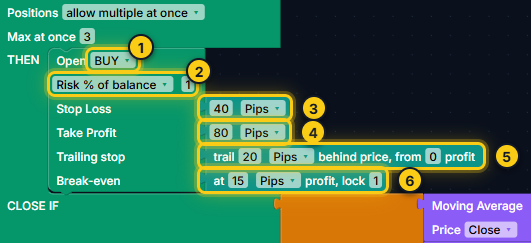
- BUY or SELL.
- Lot size: a fixed lot or Risk % of balance.
- Stop Loss.
- Take Profit.
- Trailing stop (optional).
- Break-even (optional).
Lot size
The second row of the trade block has a dropdown with two choices.
Lot Size (fixed)
Lot Size opens every trade with the same lot, from 0.01 upwards (0.1 by default). It is simple and easy to compare between backtests, but the money at risk changes with the stop distance: the wider the stop, the more a losing trade costs.
Risk % of balance
Risk % of balance sizes each trade from its stop loss. You enter a percentage from 0.01 to 10 (switching to Risk % fills in 1). At every entry the strategy:
- works out the stop loss price of the new trade;
- calculates how much 1.0 lot would lose, in your account currency, if the price went from the entry to that stop loss;
- divides the amount you are willing to lose (balance x risk %) by that loss per lot;
- rounds the result down to the broker's lot step and keeps it within the broker's minimum and maximum lot.
The balance used is the balance at that moment (closed trades only), so the lot grows after winning trades and shrinks after losing ones.
Important.Risk % needs a stop loss on that trade, because the lot is calculated from the distance to it. Without one the builder stops with: "Risk % of balance" needs a Stop Loss - the lot is computed from the distance to it. If the calculated lot is below the broker's minimum, the minimum lot is used, so that trade risks more than your percentage. This happens with small accounts and wide stops.
Worked example
EURUSD on an account in US dollars. One pip is 0.0001, and 1.0 lot is 100,000 euros, so one pip on 1.0 lot is worth 100,000 x 0.0001 = $10.
| Step | Calculation | Result |
|---|---|---|
| Balance and risk | $10,000 x 1% | $100 at risk |
| Loss per lot at the stop | 50 pip stop x $10 per pip | $500 per 1.0 lot |
| Lot | $100 / $500 | 0.20 lot |
With the same 1% but a 25 pip stop, the loss per lot is $250 and the lot becomes $100 / $250 = 0.40. The money at risk stays $100 either way; the spread and any commission come on top.
Stop loss and take profit
The Stop Loss and Take Profit slots take a distance from the entry price. For a buy, the stop loss is below the entry and the take profit above it; for a sell it is the other way round. The distance is worked out when the trade opens and stays fixed after that, unless a trailing stop or break-even moves the stop.
Units: Pips, % of Entry Price, Raw Price Distance
The stop loss size block (in the Trade drawer under Stop loss / take profit size) has a number and a unit:
| Unit | Meaning | Example |
|---|---|---|
| Pips | A distance in pips, converted to price for the asset (3 and 5 digit quotes handled). The recommended choice for forex. | Buy EURUSD at 1.1000 with a 30 pip stop: stop loss at 1.0970. |
| % of Entry Price | A percentage of the price at which the trade opened. Useful for assets with very different prices, such as indices and crypto. | Entry 1.1000, 0.5%: 1.1000 x 0.005 = 0.0055, so the stop is 55 pips away. |
| Raw Price Distance | An exact distance in price units (advanced). | Buy gold at 2,000.00 with a raw distance of 5: stop loss at 1,995.00. |
See What a pip is for how pips work on gold, indices and crypto.
Math stops such as 2 x ATR
Instead of a fixed size you can plug any value or math block into Stop Loss or Take Profit, so the stop adapts to the market. The most common is a multiple of ATR, which measures the average candle range in price units:
- Drag the stop loss block out of the trade (or leave the slot empty).
- From Advanced, drag the arithmetic block into Stop Loss and set its operator to x.
- Put a number (2) on one side and ATR (Average True Range) from Indicators on the other.
Example: if ATR(14) on EURUSD is 0.0012 when the trade opens, 2 x ATR = 0.0024, a 24 pip stop. A take profit of 3 x ATR on the same trade would be 0.0036, or 36 pips. Standard Deviation works the same way. You can also multiply a stop loss size block, for example 1.5 x 20 pips = 30 pips.
Removing a stop loss or take profit
Drag the block out of the Stop Loss or Take Profit slot and delete it (Delete key or the bin). An empty slot means no stop loss or no take profit for that trade. To put one back, drag the stop loss size block from the Trade drawer into the slot.
Warning.A trade without a stop loss only closes at its take profit, its CLOSE IF condition or by hand, and can lose far more than you expect. Always test such a strategy on a demo account.
Trailing stop
The trailing stop block (Trade drawer, under Manage open trades (plug into Open BUY / SELL)) reads trail 20 Pips behind price, from 0 profit. Plug it into the Trailing stop slot of a trade. Its unit can be Pips, % of entry or price, and both numbers use that unit.
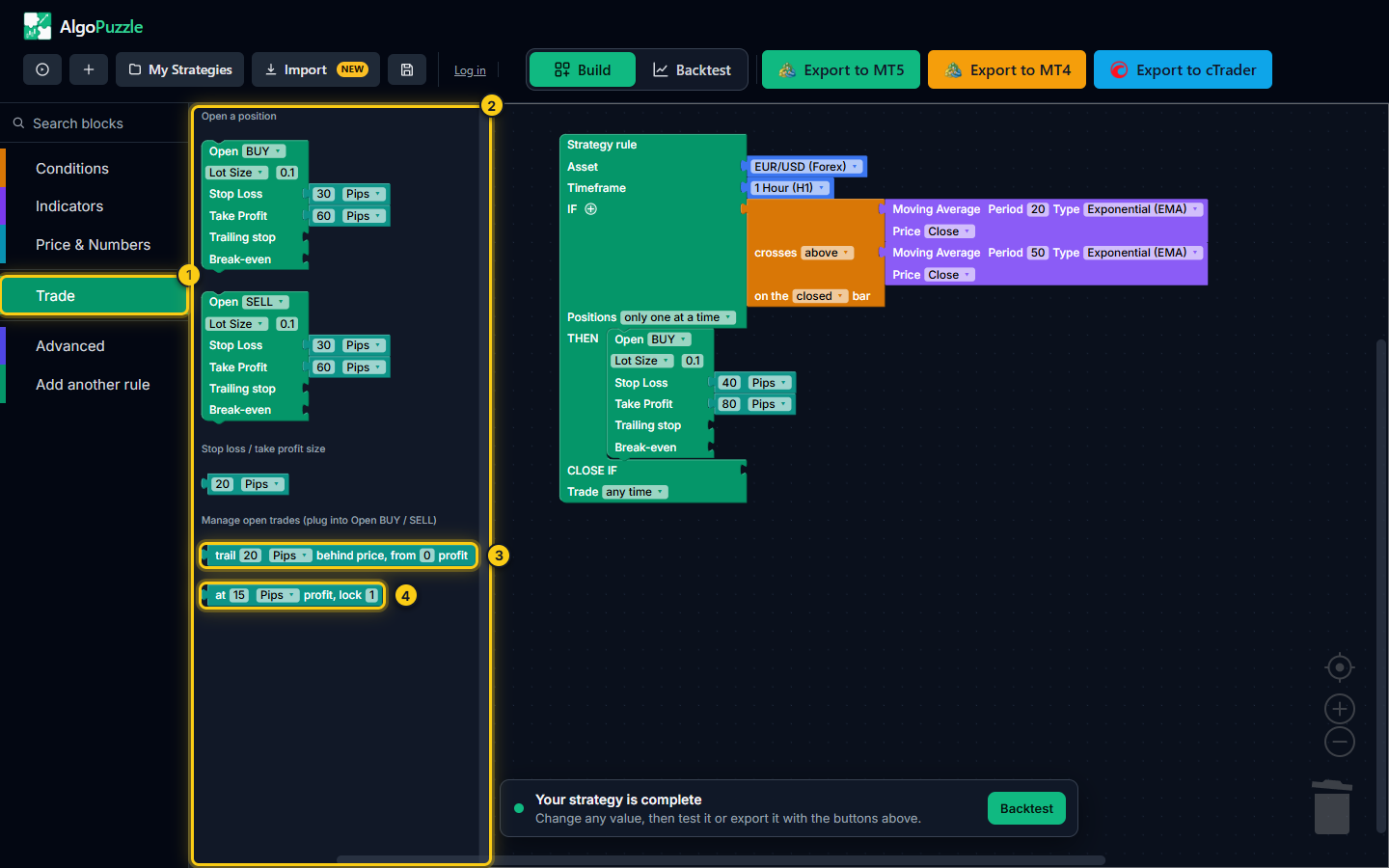
- The Trade drawer.
- Open BUY, Open SELL and stop loss / take profit blocks.
- The trailing stop block - plug it into Trailing stop.
- The break-even block - plug it into Break-even.
- trail X behind price: the stop loss is kept X away from the current price.
- from Y profit: trailing starts only once the trade is Y in profit. 0 means right away.
- The stop only moves in the trade's favour. It never moves back, and it never replaces a stop loss that is already closer to the price.
Worked example
Buy EURUSD at 1.1000 with a 30 pip stop loss (1.0970) and trail 20 Pips behind price, from 10 profit:
| Price (bid) | Profit | Stop loss |
|---|---|---|
| 1.1005 | 5 pips | 1.0970 (trailing not started yet) |
| 1.1010 | 10 pips | 1.0990 (1.1010 - 20 pips) |
| 1.1050 | 50 pips | 1.1030 |
| 1.1040 | 40 pips | 1.1030 (does not move back) |
| 1.1030 | 30 pips | Hit: the trade closes about 30 pips in profit |
For a sell the same happens mirrored: the stop follows the price down and stays above it.
Note.Very tight trailing stops are hard to judge without tick-by-tick data. A trailing distance smaller than the spread is usually rejected by brokers, and one narrower than normal one-minute price swings can look better in a backtest than it trades live. The backtest warns about both (see Reading backtest results); confirm such a strategy in MetaTrader's Strategy Tester with "Every tick based on real ticks" and on a demo account.
Break-even
The break-even block reads at 15 Pips profit, lock 1. Plug it into the Break-even slot of a trade. Once the trade is X in profit, its stop loss moves to the entry price plus Y in your favour; 0 means exactly the entry price. It happens once per trade, and only if the new stop is better than the current one.
Worked example
Sell EURUSD at 1.1000 with a 30 pip stop loss (1.1030) and at 15 Pips profit, lock 1. When the ask falls to 1.0985 (15 pips in profit), the stop loss moves to 1.0999, one pip below the entry. If the price then comes back up, the trade closes at about +1 pip instead of -30 pips. The spread can still make a "locked" trade close slightly differently from the exact level.
You can use break-even and a trailing stop on the same trade, for example lock 1 pip at 15 pips profit, then trail 20 pips from 30 pips profit.
How a position closes
An open position closes in one of these ways, whichever comes first:
| Exit | When |
|---|---|
| Stop loss | The price reaches the stop loss, including a stop moved by break-even. |
| Take profit | The price reaches the take profit. |
| Trailing stop | The price comes back to the trailing stop. |
| CLOSE IF | The rule's exit condition is true. It is checked once per new candle of the rule's timeframe, and every open position of that rule closes at market. |
If you use Trade only at set times, the time window only limits new entries. Trades that are already open keep their stop loss, take profit, trailing stop, break-even and CLOSE IF at any time. See Strategy rules.
In a backtest, stop loss and take profit are checked on one-minute price data. If both could have been hit in the same minute, the backtest assumes the stop loss, which is the cautious choice. See Running a backtest.
Risk notice.Trading leveraged products carries a high risk of loss, and backtest results are hypothetical. Test every strategy on a demo account before trading real money. See the risk disclosure.
Frequently asked questions
How does Risk % of balance calculate the lot size?
At each entry the strategy works out how much money 1.0 lot would lose if the stop loss were hit, and picks the lot so that the loss equals the chosen percentage of the current balance. With a $10,000 balance, 1% risk and a 50 pip stop on EURUSD (about $10 per pip per lot on a USD account) the loss per lot is $500, so the lot is 100 / 500 = 0.20.
Why does Risk % of balance say it needs a Stop Loss?
The lot is calculated from the distance to the stop loss. Without a stop loss there is no distance, so the builder asks you to plug a value into the Stop Loss slot of that trade.
Can I trade without a stop loss or take profit?
Yes. Drag the stop loss or take profit block out of the Open BUY / Open SELL block and the slot stays empty, which means no stop loss or no take profit for that trade. Trading without a stop loss can lose much more than you expect, so test it carefully on a demo account first.
Does the trailing stop ever move back?
No. The trailing stop only moves in the trade's favour. If the price turns against you, the stop stays where it is until it is hit or the price moves your way again.
What is the difference between a trailing stop and break-even?
Break-even moves the stop loss once, to the entry price plus the amount you lock, when the trade reaches a set profit. A trailing stop keeps following the price at a fixed distance for as long as the trade keeps moving your way.
Can one rule open a buy and a sell?
Each Open BUY or Open SELL block opens one trade when the rule's condition is true. For a strategy that buys in some situations and sells in others, use two rules, one per direction, with their own conditions.
Can't find what you need? Email support@algopuzzle.com.