Monte Carlo analysis
See how much a backtest result depended on the luck and order of its trades: the Monte Carlo tab replays the same trades many times in a random way and shows the range of outcomes.
Last updated
The Monte Carlo tab of an AlgoPuzzle backtest takes the closed trades of that backtest (at least 30 are needed) and replays them 1,000 times by default, either drawn at random (Resample) or in a random order (Shuffle). It shows the typical profit, a bad case reached in 1 run out of 20, the max drawdown reached in 1 run out of 20 next to the backtest's own, the share of runs that lost money, a chart of the range of runs after each trade, and a table of percentiles you can download as CSV. It describes the variation hidden in the past trades only; it is not a forecast of future results.
Why a Monte Carlo analysis
A backtest gives one result: the trades in the exact order they happened. But the same strategy could just as easily have met its losing trades in a cluster instead of spread out, or had a few more losers and a few fewer winners. The final profit and especially the max drawdown depend a lot on that order and on luck.
A Monte Carlo analysis makes this visible. It builds many alternative versions of your trade history from the trades the backtest actually produced, and shows how widely the results spread. If almost every run looks like your backtest, the result did not depend much on luck. If many runs had a much deeper drawdown, you should size your risk for that deeper number, not for the backtest's.
Opening the Monte Carlo tab
After a backtest, open the Monte Carlo tab under the price chart (next to Trades and Details), or click Open Monte Carlo in the line under the balance chart. Nothing has to be run separately: the analysis is calculated from the trades of the result you are looking at, and it updates when you change the strategy with Adjust strategy.
Monte Carlo needs at least 30 closed trades to say anything useful. With fewer, the tab shows Not enough trades for Monte Carlo with the number of trades the backtest has. Test a longer period or a lower timeframe to get more trades.
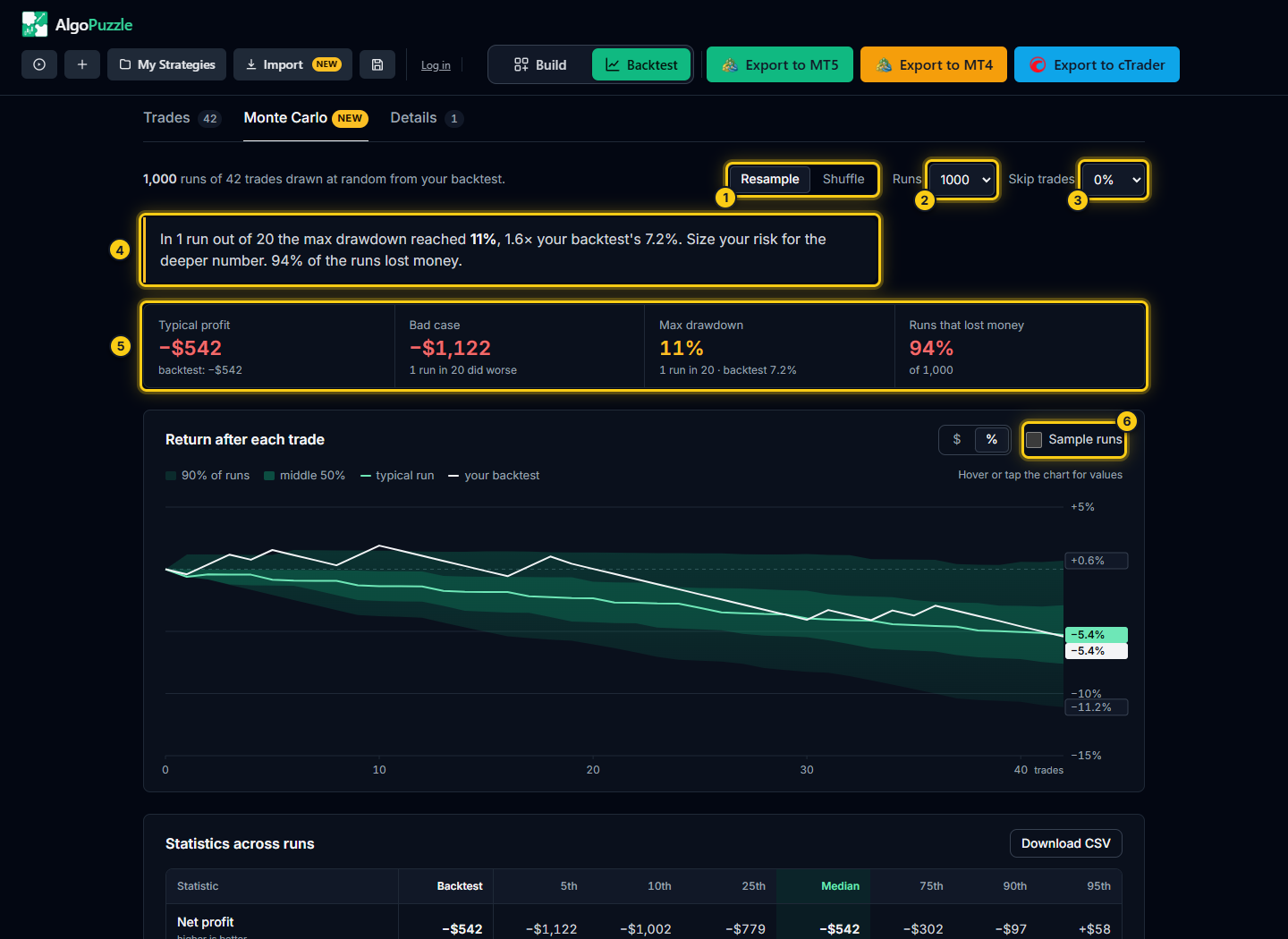
- Resample or Shuffle.
- Number of runs.
- Skip trades.
- The one-sentence summary.
- Typical profit, bad case, max drawdown and the share of runs that lost money.
- Sample runs.
Settings
| Setting | Options | What it does |
|---|---|---|
| Method | Resample (default) or Shuffle | How each run is built from your trades. See below. |
| Runs | 500, 1,000 (default) or 5,000 | How many alternative histories are built. More runs give smoother, more stable percentiles. |
| Skip trades | 0% (default), 5%, 10% or 20% | Leaves out that share of trades at random in every run, as if some signals had been missed, for example because the platform was offline or a broker rejected an order. |
Resample or Shuffle
- Resample: each run draws the same number of trades at random from your backtest's trades. A trade can be drawn more than once or not at all, so the mix of winners and losers changes from run to run, and with it the final profit. This answers: how different could the result have been with a slightly different set of trades?
- Shuffle: each run uses exactly your trades, in a new random order. The final profit is always the same; only the path changes, and with it the drawdown and the losing streaks. This answers: how deep could the drawdown have been if the same trades had come in a different order? In this mode the tiles show drawdowns only.
Fixed lot or risk %
How a trade is replayed depends on the strategy's lot setting. With a fixed Lot Size, every trade is replayed as the same amount of money it made or lost in the backtest. With Risk % of balance, each trade is replayed as a percentage of the balance before it, so gains and losses grow and shrink with the account, as they would live. The note at the bottom of the tab says which of the two was used.
The summary and tiles
The first line describes what was run, for example 1,000 runs of your trades drawn at random. Below it, one sentence gives the key finding: the max drawdown reached in 1 run out of 20, compared with your backtest's own drawdown. When that figure is 1.5 times the backtest's or more, the sentence advises sizing your risk for the deeper number; when it is close, it says the result did not depend much on the order of the trades. In Resample mode it also mentions the share of runs that lost money when that share is 5% or more.
The four tiles depend on the method:
| Method | Tile | Meaning |
|---|---|---|
| Resample | Typical profit | The median net profit of all runs: half the runs made less. Shown next to the backtest's own net profit. |
| Bad case | The net profit that only 1 run in 20 did worse than (the 5th percentile). | |
| Max drawdown | The max drawdown reached in 1 run out of 20 (only 5% of runs went deeper), next to the backtest's. | |
| Runs that lost money | The share of runs that ended below the starting balance. | |
| Shuffle | Max drawdown, backtest | The drawdown in the order the trades really happened. |
| Typical run | The median max drawdown of the runs: half the runs were lower. | |
| 1 run in 20 | The max drawdown that only 5% of runs exceeded. | |
| Worst run | The deepest max drawdown of all runs. |
The range chart
The chart, titled Return after each trade (or Balance after each trade in dollars), shows how the runs spread out as trades accumulate. Its horizontal axis is the number of trades, not dates: the point at 50 is the state of every run after its 50th trade.
- The wide band holds 90% of runs; the darker inner band the middle 50%.
- The typical run line is the median of the runs after each trade.
- your backtest is the real order of your trades, drawn on top.
- Labels at the right edge give the end values of the bands, the typical run and your backtest.
The $ / % switch shows the chart in dollars or as a return on the starting balance. Tick Sample runs to draw 40 individual runs as thin lines, which shows how bumpy single paths are compared with the smooth bands. Hover or tap the chart to read, for any number of trades, the value of your backtest, the typical run, the middle 50% and the 90% range.
If your backtest's line runs along the top of the band, it was one of the luckier orderings; if it runs near the middle, it was typical.
Statistics across runs
The Statistics across runs table puts every key statistic of your backtest next to its spread across the runs. The columns are Backtest, then the 5th, 10th, 25th, Median, 75th, 90th and 95th percentiles of the runs. Each row says whether higher or lower is better.
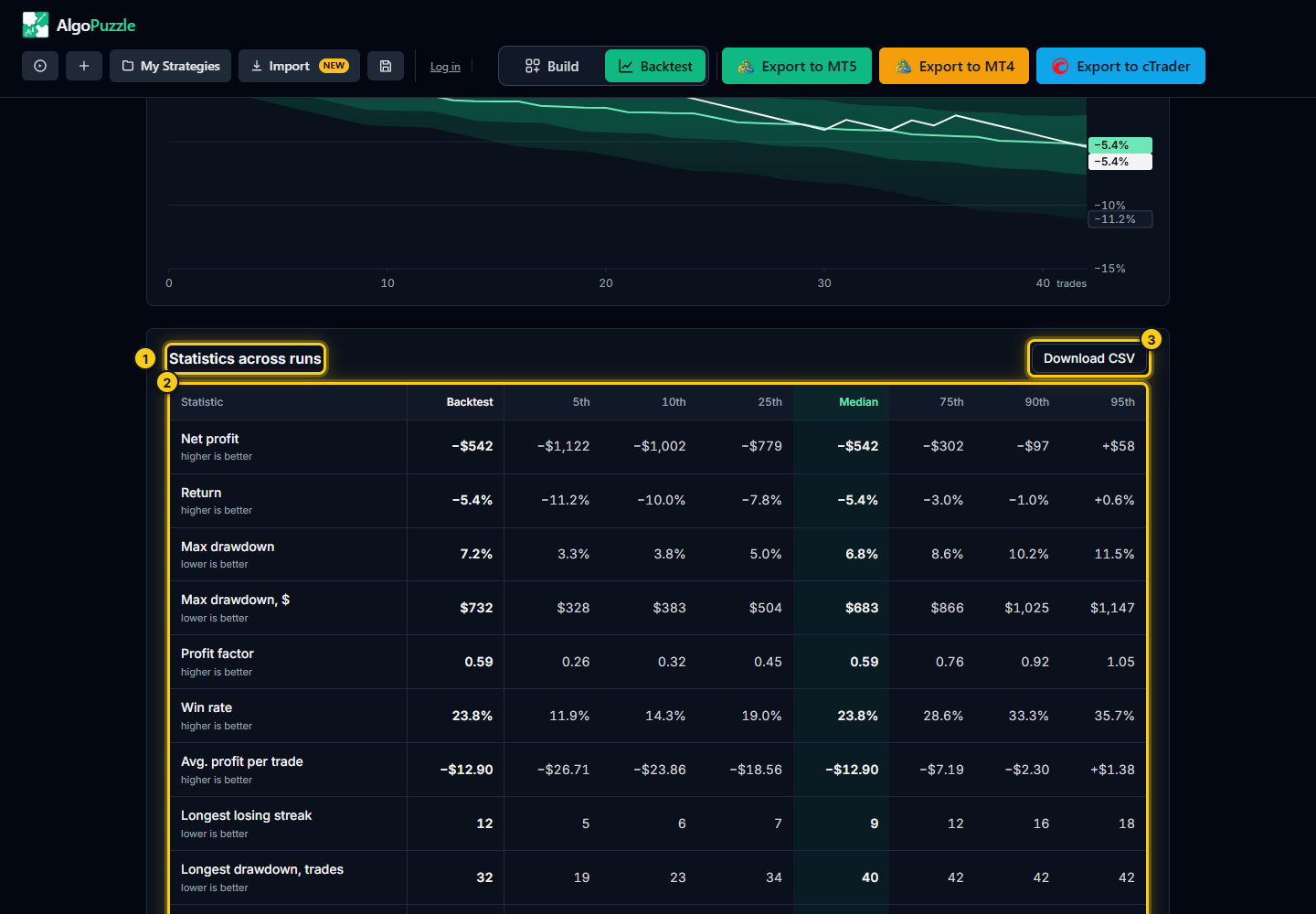
- The table heading.
- Each statistic for the backtest and for the percentiles of the runs.
- Download CSV.
| Row | Better when |
|---|---|
| Net profit | higher |
| Return | higher |
| Max drawdown (%) | lower |
| Max drawdown, $ | lower |
| Profit factor | higher |
| Win rate | higher |
| Avg. profit per trade | higher |
| Longest losing streak | lower |
| Longest drawdown, trades (how many trades the balance stayed below a previous peak) | lower |
| Recovery factor (net profit divided by max drawdown in dollars) | higher |
A percentile is the value that this share of runs stayed below: the 10th percentile of net profit means 10% of runs earned less. For drawdown, losing streaks and time in drawdown lower is better, so the 90th and 95th columns are the bad cases there, while for profit-type rows the 5th and 10th columns are.
Download CSV saves the table as a spreadsheet file (algopuzzle-monte-carlo.csv) together with the number of runs and trades, the method, the skipped share and the starting balance, so you can compare strategies side by side.
The range on the balance chart
Under the Account balance over time chart of the results, a line repeats the max drawdown reached in 1 run out of 20 next to the backtest's. Tick Show Monte Carlo range to draw the Monte Carlo runs on the balance chart: grey dashed lines mark the range that 90% of runs stayed between, and a dotted line the typical run. It follows the current Monte Carlo settings.
Same result, same numbers
The analysis is repeatable: the same backtest result with the same settings always gives exactly the same numbers. Switching methods or changing Runs or Skip trades gives new numbers; switching back restores the old ones. This makes it fair to compare two versions of a strategy.
What Monte Carlo cannot tell you
Not a forecast.Monte Carlo describes the past trades only. It reshuffles and resamples the trades your strategy took in the tested period; it cannot invent the kinds of trades the strategy has not met yet, such as a new market regime, a crash or a change in spreads. A narrow range means the backtest was not driven by the order of its trades, not that the future will look the same.
- Each trade is treated as independent of the others. If your strategy's trades cluster (for example several open at once in the same trend), real drawdowns can be deeper than the runs suggest.
- The analysis is only as good as the backtest under it. A backtest with too few trades, an unrealistic spread or an overfitted rule gives a Monte Carlo of the same quality.
- AlgoPuzzle does not check prop firm challenge rules such as daily loss limits or overnight, weekend or news restrictions.
A sensible use: take the max drawdown reached in 1 run out of 20, ask whether you could live with it, and set your lot or risk % so that it stays acceptable. Then confirm the strategy in MetaTrader's Strategy Tester and on a demo account. See position sizing: how much to risk.
Frequently asked questions
How many trades does Monte Carlo need?
At least 30 closed trades. With fewer, the Monte Carlo tab says there are not enough trades; test a longer period or a lower timeframe.
What is the difference between Resample and Shuffle?
Resample draws trades at random from your backtest, so a trade can repeat or be missing and the final profit changes. Shuffle keeps exactly your trades in a new random order, so the final profit stays the same and only the drawdown changes.
What does "1 run in 20" mean?
It is the 5th or 95th percentile of the runs: only 5% of runs were worse. For drawdown it is the drawdown that only 1 run in 20 exceeded; for profit it is the profit that only 1 run in 20 fell below.
Is Monte Carlo a prediction of future results?
No. It describes the variation hidden in the trades of the tested period only. Future markets can produce trades the backtest never saw.
Why do I get the same numbers every time?
The analysis is repeatable on purpose: the same result and settings always give the same numbers, so two versions of a strategy can be compared fairly.
Risk notice.Trading leveraged products carries a high risk of loss. Backtest results are hypothetical and do not guarantee future results. Always test a strategy on a demo account before trading real money. See the risk disclosure.
Can't find what you need? Email support@algopuzzle.com.