Strategy of the Week
A weekly lineup of independently backtested strategies you can download, study in the builder and run on MetaTrader 5, MetaTrader 4 or cTrader. One is always free.
Last updated
Strategy of the Week is AlgoPuzzle's marketplace of backtested strategies. Every week there is a new lineup: one strategy is free and the others can be bought individually as a one-time purchase. Before you buy, each strategy shows its market, timeframe and style, its full statistics (return, max drawdown, profit factor, win rate, number of trades and more) and a balance chart; the exact rules and the trade chart unlock after purchase. All strategies are tested the same way, on a fixed 1.0 lot and a $10,000 account. Downloading any strategy, including the free one, needs a free account. Purchases stay on your account, also after a strategy leaves the weekly lineup. Past performance does not guarantee future results.
What Strategy of the Week is
The Strategy of the Week page publishes a new lineup of backtested strategies every week. Each one is a complete AlgoPuzzle strategy: you can download it as a ready-to-run file for your platform, or load its blocks into the builder to see exactly how it is built, backtest it on other periods, change it and export your own version.
- One strategy is always free. It is shown at the top of the page as the free strategy of the week, with its full results.
- The others are paid. Each can be bought individually, as a one-time purchase with no subscription. Prices are shown on the Strategy of the Week page.
- Downloading any strategy needs a free account, the free one included. The account is what lets your strategies follow you to any device.
The strategies are examples to study and test, not advice. Strategies are provided for informational purposes only and do not constitute investment advice.
The Strategy of the Week page
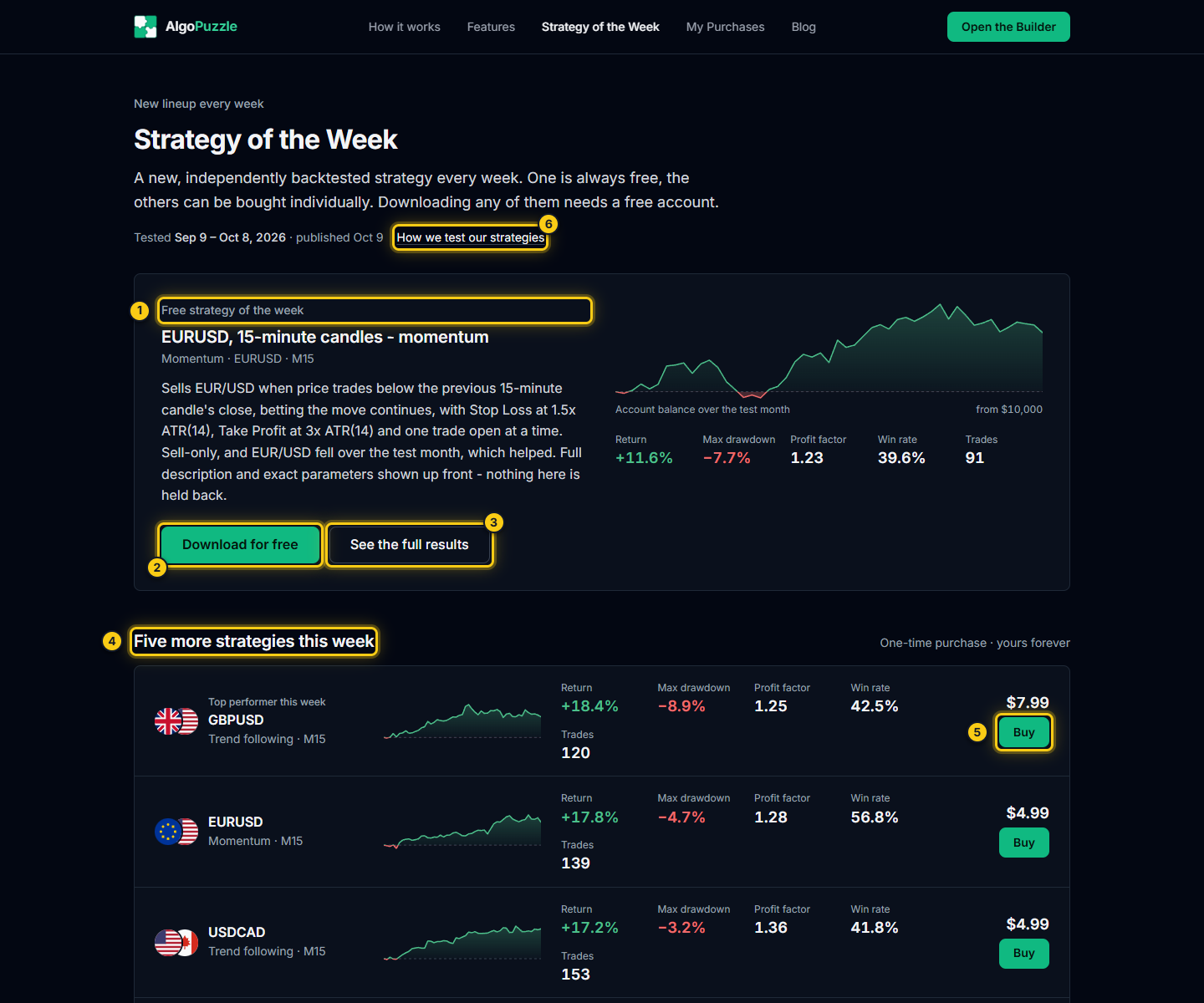
- This week's free strategy.
- Download for free.
- See the full results.
- The strategies for sale this week.
- Buy.
- How we test our strategies.
The top of the page shows the test window of the current lineup (the dates the strategies were tested on) and when it was published.
The free strategy card shows its name, style, market and timeframe, a short description, its balance over the test period and its key numbers, with two buttons: Download for free and See the full results.
Under it, more strategies this week lists the paid strategies. Each row shows the market, the style and the timeframe, a small balance curve, and the same key numbers: Return, Max drawdown, Profit factor, Win rate and Trades. The strongest result of the week may carry a Top performer this week tag. Each curve shows the account balance over the test period from a $10,000 start, green above the start and red below. Click a row to open the strategy's page, or Buy to buy it. Strategies you already own show Owned with a View & download link.
What you see before buying
A trader deciding whether to buy should see the risk profile first, so every strategy's page shows its full numbers before you pay:
- The four key numbers: Return on a $10,000 account, Max drawdown (the largest drop from a peak), Profit factor (gross profit / gross loss) and Win rate with the number of trades.
- The test window and how it was tested.
- Account balance over time, the balance after closed trades from a $10,000 start, with a % / $ switch and a lower panel showing the drop from the previous peak.
- A Details table: trades, win rate, profit factor, return, max drawdown, recovery factor, max consecutive wins and losses, best and worst trade, average win and average loss in pips, the test window, the market and timeframe, and the starting balance.
What stays hidden until you buy a paid strategy: its exact rules, the indicators and settings it uses, which direction it trades (the long / short mix is shown only after purchase), and the trade chart. The page says so next to the buy button: the exact rules and the trade chart unlock after purchase.
Tip.Win rate is never shown without profit factor and max drawdown next to it. Read all three together: they show whether a strategy made money and how much it had to go through, not just how often it won. See How to judge a result sensibly.
How the statistics are produced
Every number on the Strategy of the Week pages comes from the same testing process, before a strategy is ever listed:
- Simulated minute by minute. Each strategy is run on historical one-minute price data with the same simulation as the builder's Backtest, which is cross-checked against MetaTrader 5's own Strategy Tester on real ticks.
- Same settings for every strategy. A fixed 1.0 lot on a $10,000 account, with a realistic spread for each market. The test window is shown on every strategy.
- Full numbers up front. All statistics are shown before purchase, as described above.
These are still backtests: they are hypothetical, they do not include every real-world cost, and a strategy tested over one period can behave very differently in the next. Past performance does not guarantee future results. Read the risk disclosure and the How we test our strategies section of the page.
Getting the free strategy
- On the Strategy of the Week page, click Download for free on the free strategy.
- If you are not logged in, log in or sign up for a free account. See Account and saved strategies.
- The strategy's page opens with the download buttons, the trade chart and the full details.
The free strategy's page also shows its trade chart, Where the strategy traded, and its long / short mix.
Buying a strategy
- Click Buy on the Strategy of the Week page, or Buy to unlock on the strategy's page.
- The Purchase confirmation window shows the strategy, its price and a Before you buy reminder: past performance does not guarantee future results, and the strategy was tested on the stated dates, not on your account, your broker or future market conditions. The box I understand this is not a guarantee of profit, and I want to proceed to payment. must be ticked.
- Click Proceed to payment. If you are not logged in, log in or sign up first; the purchase continues afterwards.
- Before your first purchase, a Confirm your email window checks that the email address is yours, so receipts and password resets reach you. Click Send code, enter the code from the email under Enter your code and click Confirm and continue. It can take a minute to arrive; check spam if it does not. This happens once per account.
- Pay on the secure payment page.
- You return to the strategy's page with Purchase confirmed. This strategy is now fully unlocked and yours to keep. The trade chart can take a minute to appear after payment; refresh the page if it has not.
A purchase is a one-time payment, with instant access, no subscription and no expiry. If you leave the payment page without paying, the strategy's page says that no charge was made.
After purchase: download, load, backtest
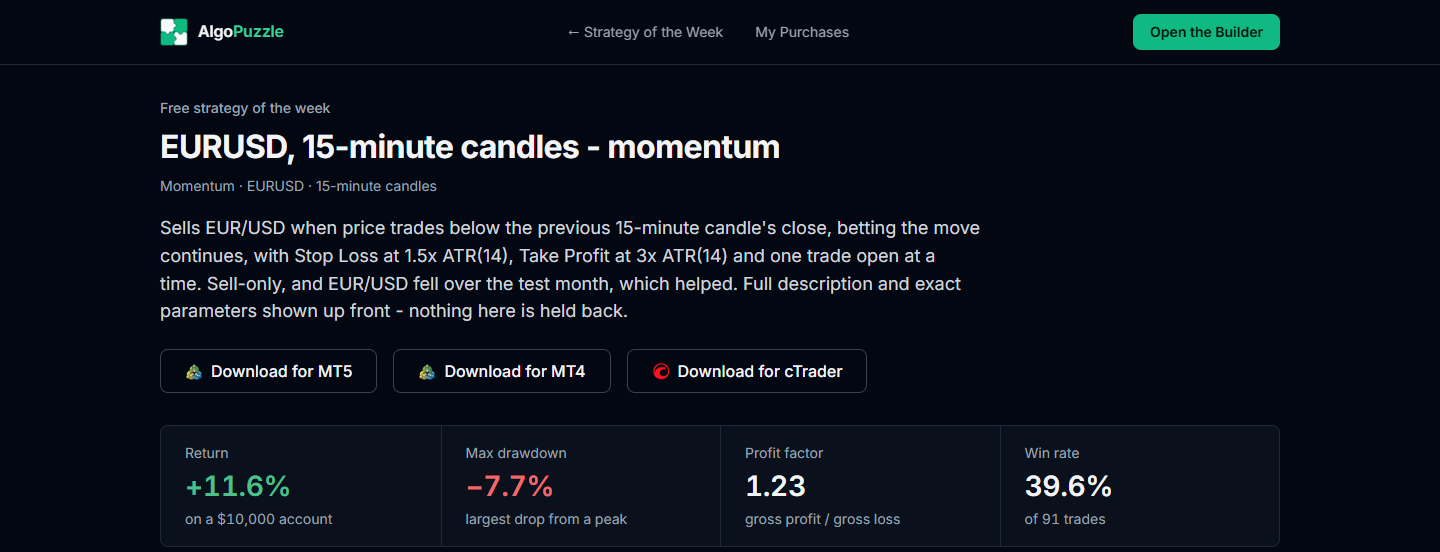
An unlocked strategy's page (for a strategy you own, or the free one) has three download buttons: Download for MT5, Download for MT4 and Download for cTrader. Each downloads the strategy as a ready-to-run file for that platform, with the same installation steps as any AlgoPuzzle export; see Export to MT5, MT4, cTrader.
The page also shows Where the strategy traded, the price chart with every trade of the test period, and a Backtest on another period button that opens the strategy in the builder's Backtest.
My Purchases
Every strategy you have bought is listed on the My Purchases page (in the top menu of the Strategy of the Week pages). Purchases are tied to your account, so log in on any device to see them; access never expires. Each card shows the strategy's key numbers and test window with two buttons:
- View & download opens the strategy's page with the download buttons.
- Backtest opens the strategy in the builder's Backtest, where you can test it on another period, spread or balance.
Load into Builder
In the builder, open My Strategies, go to the Purchases tab and click Load into Builder. The strategy's blocks appear on the canvas: you can read every rule, change any value, backtest it and export your own version. If loading fails, make sure you are logged in to the account that bought the strategy. See Purchases.
When the lineup changes
Each week the lineup is replaced by a new one. A strategy that leaves the lineup is no longer on sale, and its page says From a previous week. No longer on sale. If you bought it, nothing changes for you: it stays in My Purchases (marked as from a previous week) and in the builder's Purchases tab, you can still download it for every platform and load it into the builder, and its page shows the numbers from the week it was listed.
Using a marketplace strategy safely
- Backtest it yourself on other periods and with your broker's spread before relying on it.
- Run it in MetaTrader's Strategy Tester on your broker's data, then on a demo account.
- The statistics are based on a fixed 1.0 lot on $10,000. Choose a lot or risk % that fits your own account and the drawdown you can accept.
Frequently asked questions
Is there a free Strategy of the Week?
Yes. Every week one strategy is free. Downloading it needs a free AlgoPuzzle account.
Can I see a strategy's rules before buying it?
No. Before purchase you see the market, timeframe, style, full statistics and the balance chart. The exact rules, indicators, direction and the trade chart unlock after purchase.
How are the Strategy of the Week statistics calculated?
Each strategy is simulated minute by minute on historical one-minute price data with the same simulation as the builder's Backtest, with a fixed 1.0 lot on a $10,000 account and a realistic spread for each market. The test window is shown on every strategy. Past performance does not guarantee future results.
Is a purchase a subscription?
No. It is a one-time purchase of that strategy, with no subscription and no expiry.
What happens to a strategy I bought when it leaves the weekly lineup?
It stays yours. It remains in My Purchases and in the builder's Purchases tab, and you can still download it and load it into the builder.
Which platforms can I download a strategy for?
MetaTrader 5, MetaTrader 4 and cTrader: use Download for MT5, Download for MT4 or Download for cTrader on the strategy's page.
Risk notice.Trading leveraged products carries a high risk of loss. Backtest results are hypothetical and do not guarantee future results. Always test a strategy on a demo account before trading real money. See the risk disclosure.
Can't find what you need? Email support@algopuzzle.com.