Strategy Rules: Asset, Timeframe, IF, THEN and CLOSE IF
Every AlgoPuzzle strategy is made of one or more Strategy rule blocks. This page explains each part of the block, when a rule is checked, how a position is opened and closed, and how to combine several rules in one strategy.
Last updated
A Strategy rule says: on this Asset and Timeframe, IF a condition is true, THEN open a trade, and optionally CLOSE IF an exit condition becomes true. The rule is checked once at the start of every new candle of its timeframe, and a trade opens at that candle's opening price. Positions limits how many trades the rule may hold at once, and Trade only at set times limits new trades to chosen hours and weekdays in broker time. One rule trades in one direction, so a strategy that buys and sells uses two rules; all rules are exported together as one file.
Anatomy of a Strategy rule
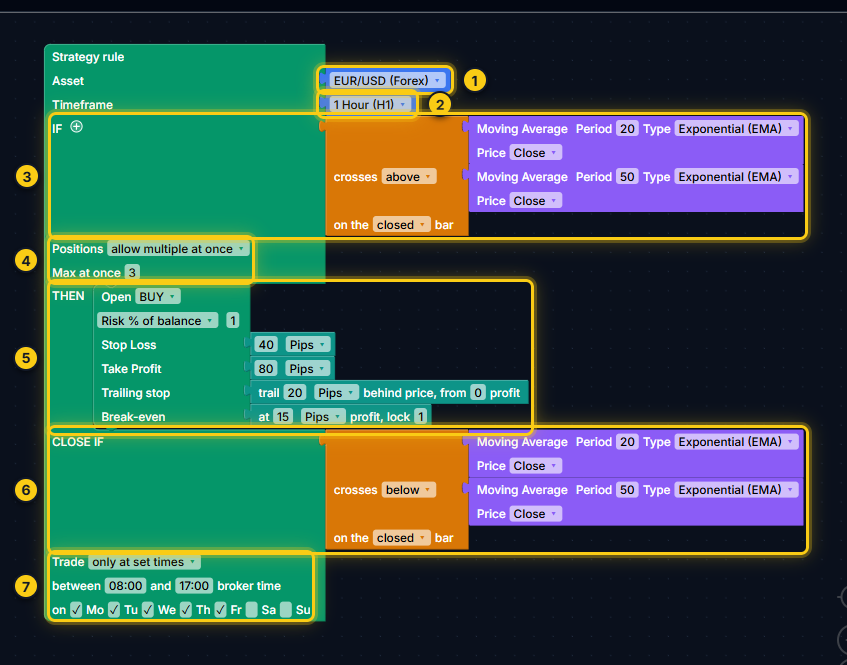
- Asset.
- Timeframe.
- IF - the entry condition.
- Positions - one at a time, or several with a maximum.
- THEN - the trade to open.
- CLOSE IF - an optional exit condition.
- Trade any time, or only at set times and weekdays.
The block has these rows, from top to bottom:
| Row | What it sets | Required |
|---|---|---|
| Asset | The market the rule trades, such as EUR/USD or Gold. | Yes (filled in) |
| Timeframe | The candles the rule reads and how often it is checked. | Yes (filled in) |
| IF | The entry condition: what has to be true to open a trade. | Yes |
| Positions | Whether the rule holds one trade at a time or several. | Yes (filled in) |
| THEN | The trade to open: Open BUY or Open SELL, with lot, stop loss and take profit. | Yes |
| CLOSE IF | An exit condition that closes the rule's open trades. | No |
| Trade any time / only at set times | Hours and weekdays in which the rule may open new trades. | Yes (filled in) |
A new rule arrives with its Asset, Timeframe, Positions and trading times already set, so you only have to fill IF and THEN. Until you do, they show grey condition and empty placeholders, and the Next step bar tells you which one is missing.
Asset
Click the Asset to open a searchable list. Type part of a name (gold, jpy, nasdaq) to filter it. The list covers:
- Forex: the majors (EUR/USD, GBP/USD, USD/JPY, USD/CHF, USD/CAD, AUD/USD, NZD/USD), the crosses between those currencies, and some exotics (USD/TRY, USD/ZAR, USD/MXN, USD/SEK, USD/NOK, USD/PLN, USD/SGD).
- Commodities: Gold, Silver, Platinum, WTI and Brent crude oil, Natural Gas.
- Indices: S&P 500, Nasdaq 100, Dow Jones 30, Russell 2000, Germany 40, UK 100, France 40, Europe 50, Japan 225, Australia 200, Hong Kong 50, Spain 35.
- Crypto: Bitcoin, Ethereum, Solana, XRP, Litecoin, Dogecoin, Cardano, BNB, Polkadot, Avalanche, Chainlink, Polygon, TRON.
- Stocks: Apple, Microsoft, Amazon, Alphabet / Google, Tesla, Nvidia, Meta, Netflix.
Custom / Other symbols
Brokers often name the same market differently: EURUSD.m, XAUUSD#, US500, GER40.cash. The exported strategy trades exactly the symbol in the Asset slot, so it has to match your broker's name. To use your broker's name, pick Custom / Other... at the end of the list. A Symbol field appears; type the symbol exactly as it appears in your platform's Market Watch.
- Up to 32 characters: letters, digits and
. _ # - + ! $ @ & / ^ ~. - No spaces and no quotes. Letters are turned into capitals.
- If you type something that is not allowed, the field keeps its previous value.
Note.The backtest has historical data for a fixed list of markets. If the strategy uses a symbol without data, the Backtest view says "No data for ..." and lists the markets that are available. You can still export the strategy and test it in your platform's own strategy tester.
Timeframe
The timeframe sets which candles the rule reads and how often it is checked. The options are 1 Minute (M1), 5 Minutes (M5), 15 Minutes (M15), 30 Minutes (M30), 1 Hour (H1), 4 Hours (H4), 1 Day (D1), 1 Week (W1) and 1 Month (MN1). New rules start on 1 Hour (H1).
An indicator inside the rule is calculated on the rule's timeframe: RSI(14) in a 1 Hour rule is the RSI of the last 14 hourly candles. To read a value from another timeframe inside the same rule, for example the 4 Hour RSI as a filter for a 15 minute rule, wrap it in the on <timeframe> block from the Advanced drawer (see Conditions).
IF: the entry condition
The IF slot takes one block from the Conditions drawer: a comparison such as RSI < 30, a signal such as "crosses above", a candle pattern, or several conditions joined with AND / OR. When the condition is true at the moment the rule is checked, the rule opens the trade in THEN.
To add a second condition, click the small + next to IF. It wraps the current condition in an AND / OR block with a free slot for the next one. Everything about conditions is on the Conditions page.
Positions
Positions controls what happens when the condition is true again while a trade from this rule is still open:
- only one at a time (the default): the rule opens nothing new until its open trade has closed.
- allow multiple at once: every new signal may open another trade, up to the number in Max at once (from 2 to 50, 3 by default). When the maximum is reached, the rule waits until one of its trades closes.
The count is per rule. A buy rule and a sell rule each have their own limit, so with "only one at a time" on both, the strategy can hold one buy and one sell at the same time.
Trade any time or only at set times
The last row of the rule decides when the rule may open new trades. any time (the default) means whenever the market is open. Choose only at set times to add two rows:
- between
08:00and17:00broker time: click a time to change it. Type it as HH:MM in 24-hour format. - on Mo Tu We Th Fr Sa Su: tick the weekdays to trade. Monday to Friday are ticked by default. At least one day must be ticked.
How the window works:
- The start time is included and the end time is not: 08:00 to 17:00 allows a new trade at 08:00 but not at 17:00.
- A window can run past midnight:
22:00to02:00allows new trades from 22:00 until 02:00. - The same start and end time (for example 00:00 and 00:00) means the whole day, so only the weekday boxes apply.
- Outside the window the rule only stops opening trades. Trades that are already open keep their stop loss, take profit, trailing stop, break-even and CLOSE IF, and can close at any time.
What "broker time" means
Times are the trading server's clock, the time shown in MetaTrader's Market Watch, which is usually not your local time. Many forex brokers run their servers two hours ahead of UTC in winter and three hours ahead in summer, but check your own broker. cTrader shows UTC; a strategy exported for cTrader reads the hours on that common forex server clock (UTC+2 in winter, UTC+3 in summer). The backtest uses the same clock.
THEN: the trade
The THEN slot takes Open BUY or Open SELL from the Trade drawer. Each has:
- a lot: Lot Size (a fixed lot) or Risk % of balance (from 0.01 to 10, sized from the stop loss distance; needs a stop loss);
- Stop Loss and Take Profit in Pips, % of Entry Price or Raw Price Distance, or a calculation such as 2 x ATR (empty means none);
- optional Trailing stop and Break-even slots.
You can stack more than one Open block in THEN; one signal then opens all of them together, and together they count as one entry for the Positions limit. Only Open BUY and Open SELL blocks are allowed in THEN. Lots, stops and trade management are explained in Trades, stops and lot size.
CLOSE IF: the exit condition
CLOSE IF is optional. It takes the same condition blocks as IF. When it is true at the moment the rule is checked, every open trade of this rule is closed at the market price. Examples:
- Close a buy when RSI(14) rises above 70.
- Close a trend trade when the fast moving average crosses back below the slow one.
- Close when the price falls below the 50-period moving average on the closed bar.
Leave it empty and trades close only at their stop loss, take profit or trailing stop. Without any of those and without CLOSE IF, a trade stays open until you close it yourself in the platform.
Tip.CLOSE IF applies to every trade of its own rule, whatever the direction. If your buy and sell trades need different exits, put them in separate rules, each with its own CLOSE IF.
When a rule is checked
A rule is checked once per new candle of its own timeframe: once an hour for a 1 Hour rule, once every 15 minutes for a 15 minute rule. At each check, in this order:
- Exit. If the rule has open trades and its CLOSE IF condition is true, they are closed at the market price.
- Trading times. If the rule uses set times and the candle opens outside them, the rule opens nothing at this check.
- Positions. If the rule already holds its maximum number of trades, it opens nothing.
- Entry. Otherwise the IF condition is read. If it is true, the trades in THEN open at the opening price of the new candle (a buy at the ask price, a sell at the bid price).
Because the exit is checked first, a trade closed by CLOSE IF can be replaced by a new one on the same candle when the entry condition is also true.
Between two checks, the rule does not look at its conditions. Stop loss, take profit, trailing stop and break-even are different: they are watched all the time, not only at the start of a candle. In the backtest they are checked on one-minute price data; if a stop loss and a take profit could both have been hit within the same minute, the backtest assumes the stop loss.
The live bar and the closed bar
At the moment a rule is checked, a new candle has just opened. Conditions can read either of two candles:
- The live bar is the candle that has just opened. It contains only its first prices, so an indicator read on it already includes the newest price.
- The closed bar is the last completed candle: the one you see finished on the chart. Reading it means "the signal appeared when that candle closed, and the trade opens right after it, at the next candle's open".
Comparisons, "crosses" and "rising / falling" blocks have a switch between on the live bar and on the closed bar. The details and examples are in Conditions: live bar or closed bar.
Multiple rules in one strategy
A strategy can hold as many Strategy rules as you need. Typical uses:
- Buy and sell. A rule opens trades in one direction, so a strategy that trades both ways uses two rules: one with Open BUY, one with Open SELL and the opposite condition.
- Several markets. Each rule has its own Asset, so one strategy can trade EUR/USD and Gold side by side.
- Several timeframes. Each rule has its own Timeframe and is checked on its own candles.
To add a rule, drag one from the Add another rule drawer, or right-click an existing rule and choose Duplicate to copy it with everything inside.
How several rules behave together:
- Each rule works on its own: its own condition, Positions limit, trading times and CLOSE IF. A rule only manages the trades it opened itself.
- All rules on the canvas are exported together as one Expert Advisor or cBot, which you attach to a single chart. The installation notes list every rule with its asset and timeframe.
- The backtest runs all the rules together in one account, so their trades share one balance.
- The Next step bar numbers the rules (Rule 1, Rule 2, ...) by their position on the canvas, from the top down. The order has no effect on how they trade.
How a position closes
An open trade closes in one of these ways, whichever comes first:
| Exit | When |
|---|---|
| Stop loss | The price reaches the trade's stop loss level. |
| Take profit | The price reaches the trade's take profit level. |
| Trailing stop | The price pulls back to the trailing stop, which follows the price as the trade moves your way. |
| Break-even stop | After break-even moved the stop loss to the entry price (plus the locked amount), the price comes back to it. |
| CLOSE IF | The rule's exit condition is true at the start of a new candle; the trade closes at the market price. |
| Manually | You close it yourself in your trading platform. |
A rule never reverses a trade by itself: a sell signal from a sell rule does not close an open buy. Use CLOSE IF on the buy rule if you want the buy to end when conditions turn.
Test before trading.How a strategy behaves depends on all of these settings together. Backtest results are hypothetical, so run any new strategy on a demo account first. See the risk disclosure.
Frequently asked questions
How do I make a strategy that buys and sells?
Use two Strategy rules: one with Open BUY and one with Open SELL and the opposite condition. Right-click the first rule and choose Duplicate to copy it, then change Open BUY to Open SELL and reverse the condition. Both rules are exported together as one file.
How often does a rule check its condition?
Once per new candle of the rule's timeframe: once an hour for a 1 Hour rule, once a day for a 1 Day rule. Stop loss, take profit, trailing stop and break-even are watched all the time, not only at the start of a candle.
Which time zone are the trading hours in?
Broker time: the clock of the trading server, as shown in MetaTrader's Market Watch. It is often UTC+2 in winter and UTC+3 in summer for forex brokers, but check your broker. A strategy exported for cTrader reads the hours on that same server clock.
What happens to open trades outside the trading hours?
Nothing changes for them. Trading hours and weekdays only stop the rule from opening new trades. Open trades keep their stop loss, take profit, trailing stop, break-even and CLOSE IF and can close at any time.
Does it matter which chart I attach the exported strategy to?
No. The exported strategy trades the asset and timeframe set in each rule, whatever chart it is attached to. What matters is that the symbol in the Asset slot matches your broker's symbol name; use Custom / Other... if it does not.
Does CLOSE IF close a trade the moment the condition becomes true?
No. CLOSE IF is checked once at the start of every new candle of the rule's timeframe, like the entry condition. If it is true then, the rule's open trades are closed at the market price.
Questions about how your rule behaves? Email support@algopuzzle.com.