Conditions: Comparisons, Crosses, Candle Patterns and AND / OR
Conditions decide when a rule opens a trade and, in CLOSE IF, when it closes one. This page describes every block in the Conditions drawer, how to combine them, which bar they read, and shows complete examples you can rebuild in a minute.
Last updated
A condition is a true-or-false question about the market, such as "is RSI(14) below 30?". The Conditions drawer offers a comparison of two values (>, <, ≥, ≤, =), crosses above and crosses below, is rising / falling for N bars, is between, nine candle patterns, and AND, OR and NOT to combine them. Two values can only be compared when they measure the same kind of thing, such as two prices or an oscillator and a number. Most condition blocks have a switch between on the live bar (the candle that just opened) and on the closed bar (the last completed candle).
How conditions work
A condition goes into the IF slot of a Strategy rule (to open trades) or its CLOSE IF slot (to close them). It is read once at the start of every new candle of the rule's timeframe. If it is true at that moment, the rule acts; if not, the rule waits for the next candle. See When a rule is checked.
Condition blocks are orange. They have slots for values: indicators from the Indicators drawer, and prices, numbers, pips, volume or spread from the Price & Numbers drawer. An empty value slot shows a grey value placeholder. Plain numbers come filled in, but indicator and price slots are left empty on purpose so you choose what to trade. All the values are described in Indicators and values.
The blocks in the Conditions drawer
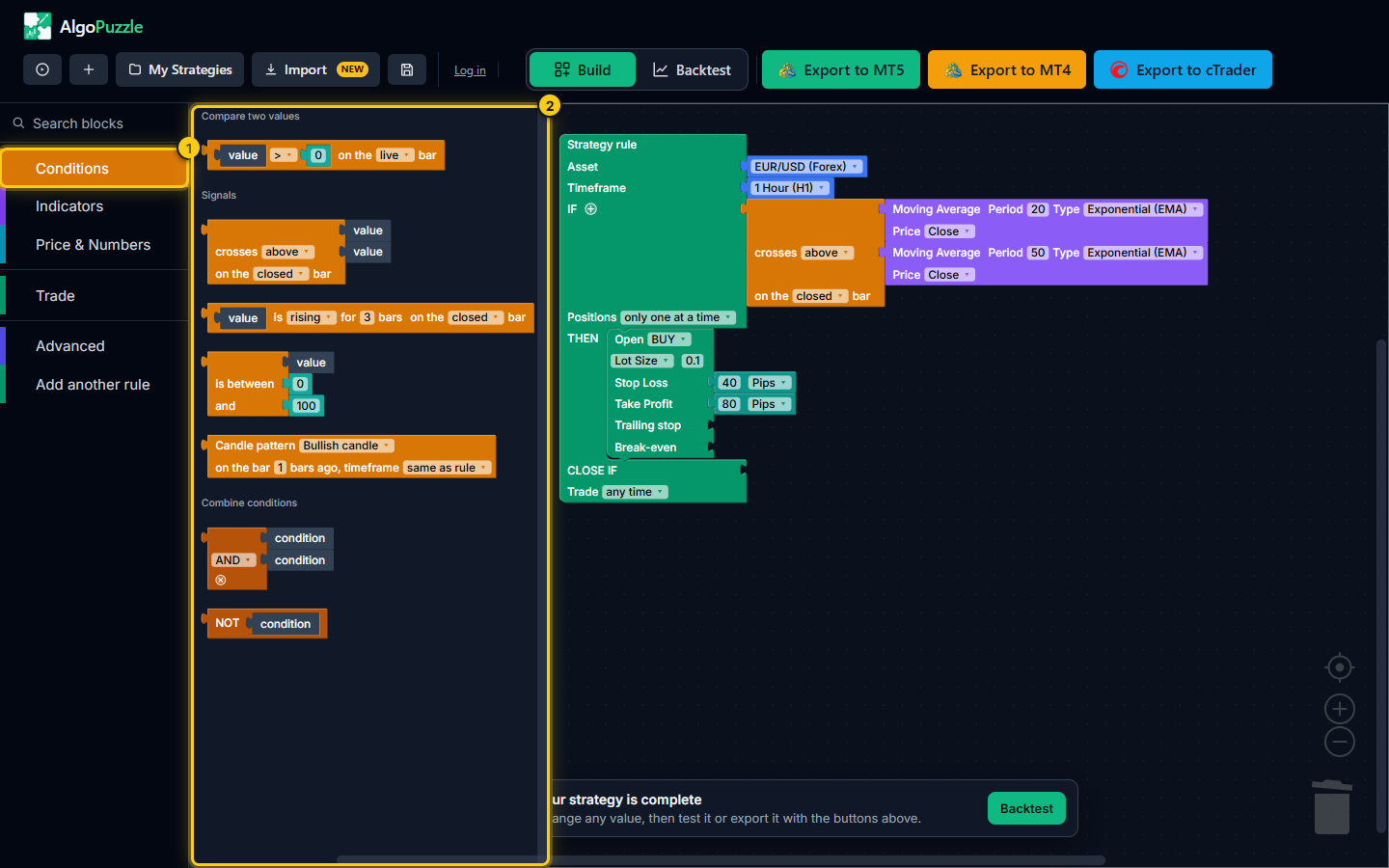
- The Conditions drawer.
- Every condition block, grouped: compare two values, signals, and combining conditions.
| Block | True when | Settings |
|---|---|---|
| Comparison | The first value is greater than, less than, at least, at most, or equal to the second. | Sign; live or closed bar |
| crosses above / below | The first value moves from one side of the second to the other on this bar. | Direction; live or closed bar |
| is rising / falling for N bars | The value went up (or down) on each of the last N bars. | Direction; N from 1 to 20; live or closed bar |
| is between | The value is inside a range, both ends included. | Low and high values |
| Candle pattern | A completed candle has the chosen shape. | Pattern; which bar; timeframe |
| AND / OR | Both conditions are true (AND), or at least one is (OR). | AND or OR |
| NOT | The condition inside it is false. | None |
Comparison
The comparison block holds two values and a sign between them. Click the sign to choose:
>greater than,<less than,≥greater than or equal to,≤less than or equal to,=exactly equal to.
The last dropdown on the block switches between on the live bar and on the closed bar (see below). A comparison taken from the drawer starts on the live bar.
Examples: "RSI(14) < 30", "Candle Data Current Price > Moving Average(200)", "ATR(14) > 20 pips", "Current Spread (pips) < 2".
The right side starts as the number 0. Click it to type another number, or drop a value over it to compare two values, such as two moving averages.
Tip.Prices and indicators are rarely exactly equal to a number, so = is seldom true for them. Use ≥ or ≤, or crosses above when you want the moment a value reaches a level.
crosses above / crosses below
This block is true only on the bar where the first value moves from below the second to above it (crosses above), or from above it to below it (crosses below). On the following bars, while the first value simply stays above, the block is false again. That makes it a signal: it fires once per crossing, while a comparison stays true as long as the situation lasts.
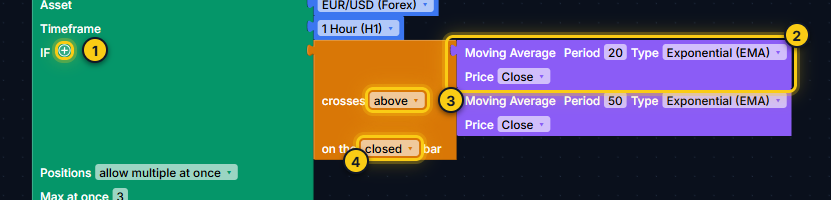
- The + next to IF adds another condition.
- The first value (here a 20-period EMA).
- The direction: above or below.
- Which bar is read: the live bar or the closed bar.
- on the closed bar (the default) compares the two most recent completed candles, exactly as you would see the cross on a chart once the candle has closed.
- on the live bar compares the candle that just opened with the one before it.
Examples: "Moving Average(20, Exponential) crosses above Moving Average(50, Exponential)", "MACD Main Line crosses above MACD Signal Line", "RSI(14) crosses above 30" (RSI coming back up out of the oversold zone).
is rising / falling for N bars
True when the value went up (rising) or down (falling) on each of the last N bars, each bar compared with the one before it. N can be 1 to 20 and starts at 3. It has the same live or closed bar switch, starting on the closed bar.
Examples: "Moving Average(50) is rising for 3 bars" as a trend filter; "ATR(14) is rising for 2 bars" to trade only while volatility grows.
is between
True when the first value is inside the range from the second value to the third, both ends included. The range starts as 0 and 100. All three values must be of the same kind (plain numbers fit anywhere). Put the lower value first: "RSI between 60 and 40" is never true.
Examples: "RSI(14) is between 40 and 60" (a neutral market), "Candle Data Previous Close [1] is between Bollinger Band Lower Band and Bollinger Band Upper Band" (the last candle closed inside the bands).
Candle pattern
Checks the shape of a completed candle. Pick the pattern from the dropdown, then set which bar to check (on the bar 1 bars ago means the last closed candle, 2 the one before it, up to 500) and the timeframe (same as rule, or any timeframe from 1 Minute to 1 Month).
| Pattern | What it means |
|---|---|
| Bullish candle | The candle closed above its open. |
| Bearish candle | The candle closed below its open. |
| Bullish engulfing | A bullish candle whose body fully covers the body of the previous, bearish candle. |
| Bearish engulfing | A bearish candle whose body fully covers the body of the previous, bullish candle. |
| Doji | The body is at most 10% of the candle's full range (high to low): open and close almost equal. |
| Hammer / bullish pin bar | A long lower wick of at least 60% of the range and an upper wick of at most 15%. |
| Shooting star / bearish pin bar | A long upper wick of at least 60% of the range and a lower wick of at most 15%. |
| Inside bar | The candle's high-to-low range lies inside the previous candle's range. |
| Outside bar | The candle's range extends beyond the previous candle's range. |
Candle patterns always look at closed candles, so they have no live or closed bar switch. Combine them with a filter for better context, for example "Bullish engulfing AND RSI(14) < 40".
AND / OR
The AND / OR block joins two conditions. Click AND to switch it to OR and back.

- + wraps the current condition in AND / OR.
- The first condition.
- AND or OR.
- The second condition.
- The x removes the AND / OR and keeps the first condition.
- AND is true only when both conditions are true: "price above the 200 MA AND RSI below 40".
- OR is true when at least one of them is true: "bullish engulfing OR hammer".
The quickest way to add a condition is the small + next to IF on the Strategy rule. It wraps the condition already in IF in an AND / OR block and leaves a free condition slot below it. Drag the next condition into that slot. Press + again for a third condition, and so on. The builder adds one free slot at a time: fill it before pressing + again.
To remove a join, click the x on the AND / OR block. The block disappears and its first condition takes its place. Dragging one of its two conditions out also removes it.
You can also drag AND / OR from the drawer and nest them. Each block joins exactly two conditions, and nesting decides the grouping: an OR block inside one side of an AND block reads "A AND (B OR C)". The two conditions of a block are stacked one below the other so long chains stay readable.
NOT
NOT reverses the condition inside it: it is true when that condition is false. Use it to exclude a situation.
Examples: "NOT Doji" (skip indecisive candles), "NOT (RSI(14) is between 45 and 55)" (avoid a flat RSI).
Comparing values of the same kind
Two values can only be compared, crossed or put in a range when they measure the same thing. Comparing the price of EUR/USD with a tick volume, or RSI (0 to 100) with CCI (around plus or minus 100), gives a rule that never means anything, so the builder does not allow it.
| Kind | Values of that kind |
|---|---|
| Price | Candle Data, Highest High / Lowest Low, Moving Average, Bollinger Band, Envelopes, Ichimoku, Alligator, Parabolic SAR |
| Oscillator (0 to 100) | RSI, Stochastic, Money Flow Index |
| Volatility | ATR, Standard Deviation |
| Its own kind | MACD; Volume; CCI; Williams %R; Momentum; DeMarker; Bulls / Bears Power; Awesome / Accelerator Oscillator; ADX / +DI / -DI; Current Spread |
| Number (fits everywhere) | A plain number, and a distance in pips |
- A plain number or a pips value can be compared with anything: you choose the number knowing what it is tested against, as in "RSI > 70".
- The Advanced blocks as of N bars ago, on <timeframe> and absolute value of take the kind of the value inside them. A math block takes the kind of its inputs, so "Current Price - Moving Average" is a price distance.
- Stop loss and take profit sizes from the Trade drawer cannot be used inside a condition.
If you drop a value of the wrong kind, it does not snap in, or it is pushed back out with a short message such as "Can't compare a price value to a volume value - different units. Disconnected the second block."
Live bar or closed bar
A rule is checked at the moment a new candle opens. At that moment there are two candles a condition can read:
- on the live bar: the candle that has just opened. It holds only its first price, so an indicator read on it includes the newest price.
- on the closed bar: the last completed candle. Its values are final and match what you see on a chart once that candle has closed.
The switch exists on comparisons, crosses and rising / falling. On a comparison, on the closed bar reads both sides one bar back, exactly like wrapping each side in as of 1 bars ago; plain numbers and pips are not shifted.
Note.The closed bar setting shifts every value in the comparison, including Candle Data. "Previous Close [1]" read on the closed bar is therefore the close of the candle two bars back. If you want the last completed close, use "Previous Close [1]" on the live bar.
Which one to use? The closed bar is the safest choice when you design from a chart: a signal you see on a finished candle is exactly what the rule reads, and the trade opens right after, at the next candle's open. The live bar reacts to the newest price, which can matter for fast price levels such as a breakout of the highest high. When in doubt, use the closed bar, and compare both in the backtest.
Advanced: earlier bars and other timeframes
Two blocks in the Advanced drawer change how a value is read. Wrap a value in them before putting it into a condition:
- as of N bars ago reads the value as it was N bars back (0 to 500). "RSI(14) as of 3 bars ago < 30" means RSI was below 30 three bars ago.
- on <timeframe> calculates the value on another timeframe than the rule's. "RSI(14) on 4 Hours > 50" inside a 15 minute rule is a higher-timeframe filter. An as of N bars ago inside it counts candles of that timeframe.
Both work on any value, including math. Details and more examples are in Indicators and values.
Worked examples
Each example lists the blocks to use. Start from an empty rule (New, Start from scratch) or replace the condition of a starting point.
RSI below 30 on the closed bar
- Drag the comparison block from Conditions into IF.
- Drag RSI from Indicators onto the left value placeholder. Keep period 14.
- Click the 0 on the right and type
30, then click the sign and choose<. - Switch the last dropdown from on the live bar to on the closed bar.
Reads: "IF RSI(14) < 30 on the closed bar". True at the start of each candle that follows a completed candle with RSI below 30.
Fast MA crosses above slow MA, and price above the 200 MA
- Drag crosses above / below into IF. It starts on crosses above, on the closed bar.
- Drop a Moving Average into each slot. Set the first to period 20 and the second to period 50; set both types to Exponential (EMA) if you like.
- Click the + next to IF. The cross moves into an AND block with a free slot.
- Drag a comparison into the free slot. Drop Candle Data (Current Price (Live)) on the left, a Moving Average with period 200 on the right, and choose
>.
Reads: "IF MA(20) crosses above MA(50) on the closed bar AND Current Price > MA(200)". The cross gives the timing; the 200 MA only allows buys in an uptrend.
Bullish engulfing at an oversold RSI
"IF Candle pattern Bullish engulfing on the bar 1 bars ago AND RSI(14) < 40 on the closed bar". Use the + next to IF to join the two.
A higher-timeframe filter
In a 15 minute rule: "IF MACD Main Line crosses above MACD Signal Line AND RSI(14) on 4 Hours > 50". Wrap the RSI in on <timeframe> from Advanced and pick 4 Hours (H4).
Spread and quiet-market filters
"... AND Current Spread (pips) < 2" skips entries while spreads are wide, for example around news or the daily rollover. "... AND ADX(14) > 25" keeps a trend strategy out of flat markets.
An exit condition for CLOSE IF
For a buy rule, put "RSI(14) > 70 on the closed bar" into CLOSE IF: the rule's open trades are closed when RSI reaches overbought, even if the take profit was not hit. See CLOSE IF.
Examples, not advice.These examples show how to build conditions. They are not trading recommendations and say nothing about future results. Backtest results are hypothetical; test any strategy on a demo account first (risk disclosure).
Frequently asked questions
Why won't my value snap into a comparison?
Both sides of a comparison must measure the same kind of thing, such as two prices or an oscillator and a number. A plain number or pips value fits next to anything. If the kinds do not match, the block does not snap in or is pushed back out with a message such as "Can't compare a price value to a volume value".
Should I use the live bar or the closed bar?
The closed bar reads the last completed candle, which is what you see on a finished chart candle, so it is the safest choice when you design from a chart. The live bar reads the candle that has just opened and includes the newest price. If unsure, use the closed bar and compare both in the backtest.
How do I combine three or more conditions?
Click the small + next to IF once for each extra condition. Each click wraps the current condition in an AND / OR block with a free slot for the next one. Click AND to switch a join to OR. Nest AND / OR blocks to group conditions, for example A AND (B OR C).
What is the difference between "crosses above" and ">"?
A comparison such as fast MA > slow MA is true on every bar while the fast average is above. Crosses above is true only on the one bar where the fast average moves from below to above the slow one, so it marks the moment of the change.
Why does my rule never open a trade?
The condition was never true at the start of a candle. Common causes: an equals sign with prices, a range written high to low in is between, several strict conditions joined with AND, or a closed bar setting that shifts Previous Close one bar further back. Loosen one condition at a time and check the result in the backtest.
Can a condition use a value from another timeframe?
Yes. Wrap the value in the on <timeframe> block from the Advanced drawer, for example RSI(14) on 4 Hours inside a 15 minute rule. Candle patterns have their own timeframe setting.
Can't express your idea with these blocks? Email support@algopuzzle.com.