Running a backtest
Test the strategy on your canvas against real historical market data before you export it: choose a period, a spread and a starting balance, press Run backtest and see every trade it would have taken.
Last updated
AlgoPuzzle's Backtest replays the strategy on your canvas on real historical market data for a period you choose (last week up to the last year, or custom dates). Switch the header from Build to Backtest, set the Period, Spread and Starting balance, and press Run backtest. Rules are checked once per new candle, trades open at that candle's open price, and stop loss and take profit are checked minute by minute. Backtesting is free and needs a free account to load the market data. Results are a quick, hypothetical simulation: confirm a strategy in MetaTrader's Strategy Tester and on a demo account before trading real money.
What the backtest does
A backtest answers one question: if this exact set of rules had been running during a past period, which trades would it have opened and closed, and how would the account balance have changed? AlgoPuzzle replays the strategy on your canvas against real historical market data, candle by candle and minute by minute, and shows the result next to your blocks. You do not need to export anything or install a trading platform to run it.
The backtest uses the same strategy you will export: the same asset and timeframe in each rule, the same conditions, the same lot size, stop loss, take profit, trailing stop, break-even, exit condition and trading times. That makes it a quick way to catch a rule that never fires, a stop loss that is far too tight, or a strategy that trades far more often than you expected, before you spend time in MetaTrader or cTrader.
Opening Backtest
The header of the builder has a Build | Backtest switch. Build shows the canvas with your blocks; Backtest replaces the canvas with the Backtest panel for the strategy on it. Your blocks are not changed or lost when you switch, and you can go back at any time with Build or the Edit blocks link.
- Finish the strategy. The strategy must be complete before it can be tested. The Next step bar at the bottom of the canvas tells you what is still missing; when nothing is, it says Your strategy is complete and shows a Backtest button. See The builder screen.
- Switch to Backtest. Click Backtest in the header switch, or the Backtest button in the Next step bar.
- Check the summary. Under Strategy on your canvas the panel describes your rules in one plain sentence, for example which market it trades, when it enters and how each trade is protected, followed by the strategy's name, market and timeframe. Read it once: it is the quickest way to spot a rule that does not say what you meant.
If the strategy is not complete, the panel shows Your strategy isn't complete yet with the reason and a Back to Build button. The same completeness check runs before an export, so a strategy that can be backtested can also be exported.
Logging in to load the data
Backtesting is free, but the historical market data loads only for logged-in users. If you press Run backtest while logged out, the log-in window opens; log in or create a free account (email and password, no card) and the backtest starts right after. The panel also reminds you with Log in to run a backtest on our market data. See Account and saved strategies.
Test settings
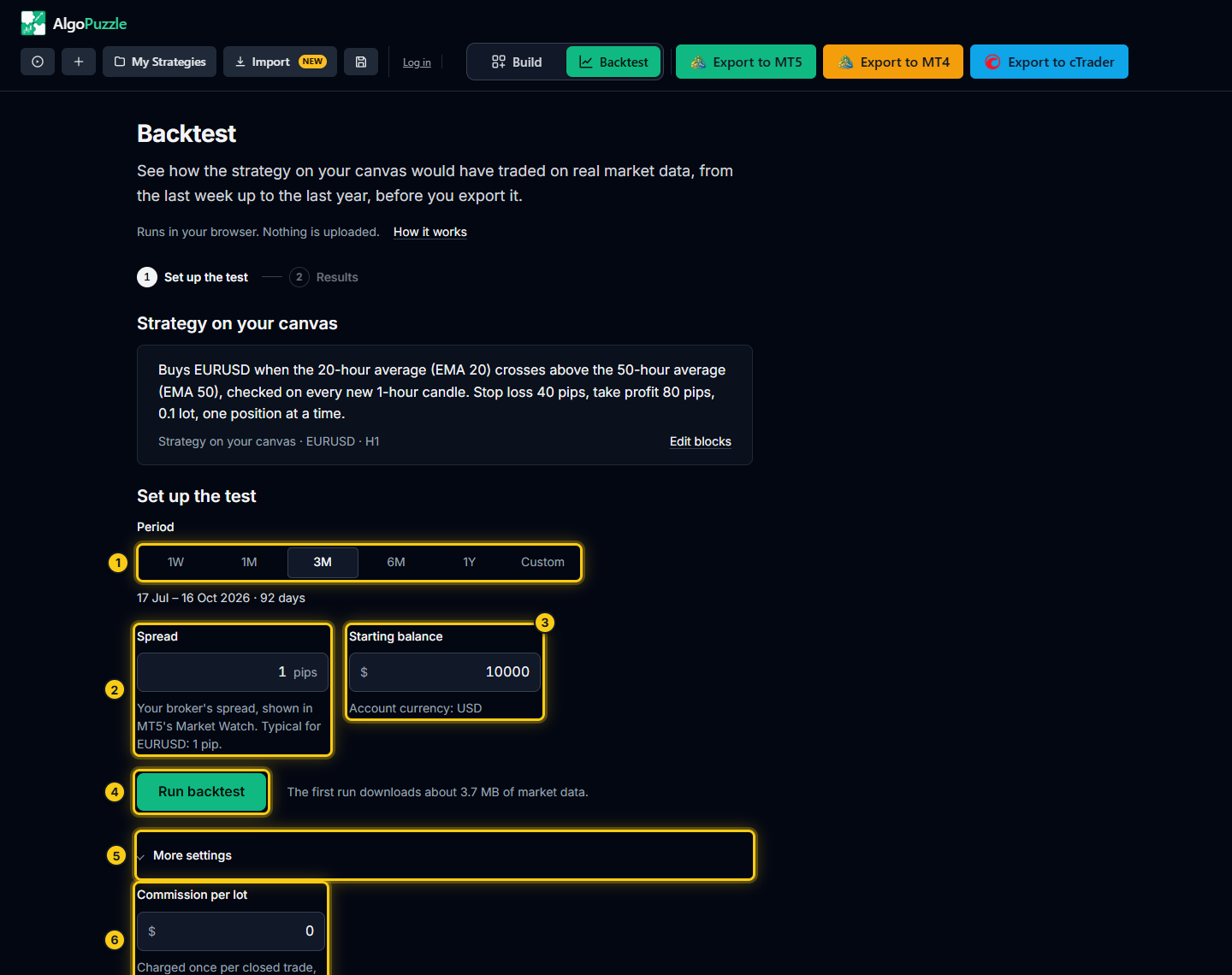
- Period.
- Spread.
- Starting balance.
- Run backtest.
- More settings.
- Commission per lot.
The panel works in two steps, shown at the top as 1 Set up the test and 2 Results. The setup step has these settings:
| Setting | What it does | Options and limits |
|---|---|---|
| Period | The stretch of history the strategy is tested on. Presets always end at the latest available data. | 1W (last week), 1M (last month), 3M (last 3 months, the default), 6M, 1Y (last year) or Custom. |
| Spread | The broker's spread in pips, charged on every trade. A typical value for the market is filled in. | 0 to 500 pips. The hint under the field shows the typical spread for the market. |
| Starting balance | The account balance at the start of the test. Return and drawdown percentages are measured against it, and risk % lots are sized from it. | $100 to $1,000,000. Default $10,000. Account currency: USD. |
| Commission per lot (under More settings) | A broker commission, charged once per closed trade, per lot. | $0 to $50. Default $0. |
Period
Click one of the period buttons. The line under them shows the exact dates and the number of days that will be tested. How far back you can go depends on how much history is available for the market: a preset that would start before the available data is greyed out, and its tooltip says Not enough data for this period yet. The history covers up to the last 12 months.
Custom shows two date fields, From and To (last day included). A custom period must be at least 7 days and at most 1 year (365 days), and it must lie inside the available data; if it does not, a short message under the fields says what to change.
Indicators need some history before they produce a value (a 200-period moving average needs 200 candles). The backtest reads the data before your start date to warm indicators up, but it never opens trades before the period begins.
Spread
The spread is the difference between the buy (ask) and sell (bid) price, and it is a real cost on every trade. Enter the spread your broker usually shows for this market in your platform's Market Watch. Leaving the suggested value is fine for a first test; raise it to see how sensitive the strategy is to costs. Strategies that make small profits per trade, especially on low timeframes, can turn from gains to losses with a slightly wider spread. Read more in how the spread changes the win rate you need.
When a strategy trades several markets, the Spread field is disabled and each market is tested with its own typical spread, because one pip means very different amounts of money on, for example, gold and a currency pair.
Starting balance and commission
With a fixed Lot Size, the starting balance does not change which trades are taken or their profit in dollars, only the percentages (return and drawdown). With Risk % of balance, the lot of each trade is calculated from the current balance and the stop loss distance, so the balance matters directly. See Trades, stops and lot size.
Open More settings to enter a Commission per lot if your broker charges one (common on raw-spread accounts). The same section shows Available data: the markets you can backtest and the date range of the history.
Which markets can be backtested
Backtest works on a fixed list of popular markets, shown in the panel under More settings > Available data. The builder itself lets you pick many more assets, including any symbol your broker offers through Custom / Other..., and all of them can still be exported. If a rule uses a market that is not on the backtest list, the panel says so before the run and lists it under This strategy uses blocks the quick backtest can't simulate yet.
- Broker-style symbol names with a suffix or prefix (for example a currency pair with
.aat the end) are usually matched to the listed market automatically. - A strategy whose rules trade different markets is tested on all of them together, up to 5 markets in one backtest.
- Every timeframe offered in the builder can be backtested.
Running the test
Press Run backtest. A progress bar shows the market data loading and then the simulation. The first run for a market and period takes a few seconds while the data loads (the note under the button shows the approximate size); repeated runs are faster. You can stop a run with Cancel.
When the run finishes, the panel moves to Results. Use Change settings to go back to the setup with the same strategy, or Edit blocks to return to the canvas. If you change blocks on the canvas after a test, the old result no longer describes the strategy, so the panel clears it and says Your blocks changed since the last test. Run the test again to see results for this version. How to read the results is covered in Reading backtest results.
If something goes wrong, the panel shows The backtest could not finish with the reason and a Try again button. If the market data cannot be reached at all, it says so and backtests are unavailable until the data loads again; try later.
How the simulation trades
The backtest follows the same rules as the exported Expert Advisor or cBot. In plain terms:
| Step | What happens in the backtest |
|---|---|
| Checking the rules | Each rule's IF condition is checked once per new candle of the rule's timeframe, not on every price change. A 1 Hour rule is checked at the start of every hour. |
| Opening a trade | When the condition is true, the trade opens at the open price of the candle that has just started. A buy opens at the ask (bid plus spread), a sell at the bid. |
| Positions | With only one at a time, no new trade opens while the rule's trade is still open. With allow multiple at once, new trades open up to the maximum you set. |
| Stop loss and take profit | Checked minute by minute on historical one-minute price data for as long as the trade is open. |
| Both in the same minute | If the stop loss and the take profit could both have been hit inside the same minute, the backtest assumes the stop loss was hit first. This is the conservative choice, and the results say how often it happened. |
| CLOSE IF | The exit condition is checked once per new candle, like the entry, and closes the trade at market. |
| Trading times | Outside the times you set, a rule opens no new trades; trades already open keep their stop loss, take profit, trailing stop, break-even and CLOSE IF. |
| End of the period | A trade still open when the period ends is closed at the last price and marked End of test. |
The on the live bar / on the closed bar switch on comparison, cross and rising/falling blocks works the same way as in the exported strategy. See Conditions.
Trailing stop and break-even
A one-minute candle has four prices: open, high, low and close. Trades with a trailing stop or break-even are simulated on those four prices in order (open, then low or high, then close), so the stop can follow the price inside each minute and the break-even trigger is caught when the price reaches it.
One caveat matters for very tight trailing stops. Inside a minute whose price range is wider than the trailing distance, the backtest moves the trailing stop only at the minute's open and close, not at its high or low. Without real tick data, nobody can know whether the price first went up and then down inside that minute, and assuming the best case would make a very tight trailing stop look far better than it trades live. When this happens often, the results show a note about it. A trailing stop in pips that is tighter than the spread gets a note in the setup step before the run, because brokers usually reject stops that close to the price.
Tip.If your strategy relies on a trailing stop of only a few pips, treat the backtest as a rough guide and confirm it in MetaTrader's Strategy Tester with the Every tick based on real ticks model.
Notes and warnings on a run
Some situations do not stop the backtest but make its numbers less certain. They are listed after the run in the Details tab under Notes on this run, and the most important ones are repeated under the balance chart. Typical notes:
- Too few trades. Fewer than 30 trades are not statistically meaningful.
- Stop loss and take profit in the same minute. How many trades were resolved by assuming the stop loss first.
- Positions still open at the end. Closed at the last price of the period.
- Indicator warm-up. At the very start of the history, indicators had too little data and no signals were taken there.
- Spread below the typical real spread. If you enter a spread lower than the market normally has, the results are optimistic.
- Trailing stop tighter than the spread, or narrower than normal one-minute swings. See the caveat above.
- Risk % sizing. If the calculated lot was below the 0.01 minimum, 0.01 was traded (more risk than set); entries without a stop loss distance cannot be sized and are skipped. Lot sizes are rounded to the 0.01 lot step.
All notes are explained in Reading backtest results.
Blocks that cannot be simulated yet
Almost every block in the builder can be backtested. When a strategy uses something the quick backtest cannot simulate yet, for example a market that is not on the backtest list or more markets than one backtest can hold, the panel shows This strategy uses blocks the quick backtest can't simulate yet and lists what is not supported. Rather than guess and show numbers that might be wrong, it does not run. The strategy itself is fine: you can still export it and test it in MetaTrader's Strategy Tester, which supports every block the builder makes.
"The rule never fired in this period"
This message means the strategy opened no trades: the IF condition was never true on any candle of the period (or never true during your trading times). It is not an error. Common reasons:
- The condition is too strict, for example RSI below 10 on a high timeframe, or several conditions joined with AND that rarely happen together.
- The period is short. A strategy on 4 Hour candles that waits for a rare setup may need 6 months or a year to trade at all.
- Trading times or weekdays leave very little time to trade.
- A comparison points the wrong way (above instead of below), or compares values that almost never meet.
Loosen the condition, test a longer period or a lower timeframe, and check the plain-English summary at the top of the panel against what you meant. See also Troubleshooting and FAQ.
Limits of a backtest
The AlgoPuzzle backtest is a quick simulation on one-minute data, designed to be honest about what it cannot know. A live account will differ:
- Spreads at a real broker change all the time and widen around news and market opens; the backtest uses one spread for the whole period.
- Swaps (overnight financing) are not included.
- Fills can be worse than the price the rule asked for (slippage), and brokers have minimum stop distances.
- The past is not the future. A strategy that did well over a few months can do badly over the next few. Backtest results are hypothetical.
For a closer check, export the strategy and run it in MetaTrader's Strategy Tester on the same symbol, timeframe and dates with the Every tick based on real ticks model (see how to backtest an EA in the MT5 Strategy Tester). Small differences from the AlgoPuzzle backtest are normal. Then run it on a demo account for a while before you consider real money. See Export to MT5, MT4, cTrader.
Frequently asked questions
Is the AlgoPuzzle backtest free?
Yes. Building, backtesting and exporting are free. The historical market data loads only for logged-in users, so you need a free account (email and password, no card).
How far back can I backtest?
Up to the last 12 months, depending on how much history is available for the market. Choose 1W, 1M, 3M, 6M or 1Y, or Custom dates between 7 days and 1 year long. Presets without enough history are greyed out.
Why does the backtest open trades at the open of a candle?
Rules are checked once per new candle, exactly like the exported strategy. When the condition is true, the trade opens at the open price of the candle that has just started: buys at the ask, sells at the bid.
What happens if the stop loss and take profit are both hit in the same minute?
The backtest assumes the stop loss was hit first. It is the conservative choice, and the run's notes say how many trades it affected.
Why can't my strategy be backtested?
The panel lists the reason under "This strategy uses blocks the quick backtest can't simulate yet", usually a market that is not on the backtest list or too many markets at once. You can still export the strategy and test it in MetaTrader's Strategy Tester.
Why are my backtest results different from MetaTrader's Strategy Tester?
The AlgoPuzzle backtest is a quick simulation on one-minute data with one spread for the whole period; the Strategy Tester replays real ticks with your broker's own data, spreads and swaps. Small differences are normal. Compare on the same symbol, timeframe and dates.
Risk notice.Trading leveraged products carries a high risk of loss. Backtest results are hypothetical and do not guarantee future results. Always test a strategy on a demo account before trading real money. See the risk disclosure.
Can't find what you need? Email support@algopuzzle.com.